

Ultimate Business Intelligence Guide for CEOs by a CEO in 2026 + Reddit Comments
If I were buying a business intelligence platform in 2026, I’d start here: Power BI is still the safest default, Tableau is still best at visual analysis, Looker is still only worth it if you already have a real data team, Qlik is better than its market buzz, Sigma is the modern pick, and most companies are paying for complexity they will never use. The license is not the expensive part. The mess you create six months later is.
I'd avoid Looker, as a current admin of both that and Tableau. Looker is way more expensive and much more complicated to use (LookML is its own language). If you have on-prem servers it's also difficult to set up connections.
I like that quote because it gets to the point.
I’ve had to make this call with my own money. At FluxoMetric, I burned ~$4K a month on tools that looked great in demos and turned into chores in production. Later, at Meyer Growth Labs, I inherited BI setups that were already half-rotten. Nice dashboards. Bad models. Confused definitions. Nobody trusted the numbers.
That’s what this guide is about. Not features in isolation. Operating reality.
TL;DR
Here’s the fast shortlist for a business intelligence platform decision.
| Factor | Power BI | Tableau | Looker | Qlik | Sigma | ThoughtSpot | Domo | Metabase | Zoho Analytics | Winner |
|---|---|---|---|---|---|---|---|---|---|---|
| Best use case | Default buy | Visual analysis | Governed metrics | Underrated enterprise | Modern self-service | Search-first analytics | Fast rollout | Cheap/open source | SMB budget | Depends |
| Visuals | ⭐⭐⭐⭐☆ | ⭐⭐⭐⭐⭐ | ⭐⭐⭐☆☆ | ⭐⭐⭐☆ | ⭐⭐⭐☆ | ⭐⭐⭐☆ | ⭐⭐⭐☆ | ⭐⭐☆☆☆ | ⭐⭐⭐☆☆ | Tableau |
| Self-service | ⭐⭐⭐⭐☆ | ⭐⭐⭐⭐☆ | ⭐⭐⭐☆☆ | ⭐⭐⭐⭐☆ | ⭐⭐⭐⭐⭐ | ⭐⭐⭐⭐⭐ | ⭐⭐⭐⭐☆ | ⭐⭐⭐⭐☆ | ⭐⭐⭐⭐☆ | Sigma / ThoughtSpot |
| Governance | ⭐⭐⭐⭐☆ | ⭐⭐⭐☆☆ | ⭐⭐⭐⭐⭐ | ⭐⭐⭐⭐☆ | ⭐⭐⭐☆☆ | ⭐⭐⭐☆☆ | ⭐⭐⭐☆☆ | ⭐⭐☆☆☆ | ⭐⭐⭐☆☆ | Looker |
| Scale | ⭐⭐⭐⭐☆ | ⭐⭐⭐⭐☆ | ⭐⭐⭐⭐⭐ | ⭐⭐⭐⭐☆ | ⭐⭐⭐⭐☆ | ⭐⭐⭐⭐☆ | ⭐⭐⭐⭐☆ | ⭐⭐⭐☆☆ | ⭐⭐⭐☆☆ | Looker |
| Pricing sanity | ⭐⭐⭐⭐⭐ | ⭐⭐☆☆☆ | ⭐⭐☆☆☆ | ⭐⭐⭐☆☆ | ⭐⭐☆☆☆ | ⭐⭐☆☆☆ | ⭐⭐☆☆☆ | ⭐⭐⭐⭐⭐ | ⭐⭐⭐⭐⭐ | Power BI / Metabase / Zoho |
| Dev friendliness | ⭐⭐⭐☆☆ | ⭐⭐⭐☆☆ | ⭐⭐⭐⭐☆ | ⭐⭐⭐⭐☆ | ⭐⭐⭐⭐☆ | ⭐⭐⭐☆☆ | ⭐⭐⭐☆☆ | ⭐⭐⭐⭐☆ | ⭐⭐⭐☆☆ | Looker / Qlik / Sigma / Metabase |
| Stability | ⭐⭐⭐⭐☆ | ⭐⭐⭐⭐☆ | ⭐⭐⭐⭐☆ | ⭐⭐⭐⭐☆ | ⭐⭐⭐⭐☆ | ⭐⭐⭐⭐☆ | ⭐⭐⭐⭐☆ | ⭐⭐⭐☆☆ | ⭐⭐⭐☆☆ | Tie |
| External intelligence fit | ⭐⭐⭐⭐☆ | ⭐⭐⭐⭐☆ | ⭐⭐⭐⭐⭐ | ⭐⭐⭐⭐☆ | ⭐⭐⭐⭐⭐ | ⭐⭐⭐⭐☆ | ⭐⭐⭐⭐☆ | ⭐⭐⭐⭐☆ | ⭐⭐⭐☆☆ | Looker / Sigma |
| Overall score | 3.9/5 | 3.7/5 | 4.1/5 right team, 2.8/5 wrong team | 3.9/5 | 4.0/5 | 3.8/5 | 3.6/5 | 3.4/5 | 3.6/5 | Power BI default |
My short version:
- Best default buy: Power BI
- Best visuals: Tableau
- Best governed metrics: Looker
- Most underrated: Qlik
- Best modern UX: Sigma
- Best search-first pick: ThoughtSpot
- Best fast-start dashboard stack: Domo
- Best cheap/open source option: Metabase
- Best SMB value: Zoho Analytics
- Best external company intelligence layer for BI: NinjaPear
Why most BI advice sucks
Most business intelligence platform advice is written by one of three people:
- The vendor.
- An affiliate writer.
- Somebody who has never had to own a renewal.
So you get a lot of words and not much help.
What matters is not whether a demo looks clean. What matters is whether the thing still works after the analyst who built the first dashboards leaves. What matters is whether finance hates the renewal. What matters is whether your org trusts the same metric in three places.
This is also where a lot of buying guides miss the real problem. They compare dashboard tools as if the dashboard layer is the whole job. It isn’t.
A business intelligence platform tells you what happened inside your company. A CEO also wants to know what changed outside the company. Competitor moves. Customer overlap. Org changes. Pricing changes. New hires. That is not something Tableau or Power BI invent for you. You need outside data for that.
How I scored them
I scored these tools on operating reality, not demo quality.
That means I care about the following nine things:
- Visualization quality
- Self-service ease
- Governance / semantic consistency
- Scalability
- Pricing sanity
- Developer friendliness
- Stability / admin sanity
- Data freshness support
- Fit for external intelligence workflows
The star ratings below are not about which vendor tells the prettiest story. They’re about what happens when normal people have to live with the thing.
The fast answer
Best default buy
Power BI
This is still the default answer for most companies. Cheap enough. Familiar enough. Safe enough.
That doesn’t mean it’s clean. It means it’s survivable.
Best for visual analysis
Tableau
Still the best visual analysis tool in the group. Still expensive. Still worth it for the right team.
Best for governed metrics
Looker
If the real problem is trust and definition control, Looker deserves a serious look.
If your data stack is still loose, do not buy this.
Most underrated pick
Qlik
Qlik gets ignored because it doesn’t win the popularity contest. Product-wise, that’s not fair.
Best modern challenger
Sigma
Sigma is what a lot of warehouse-native teams hoped old-school BI would become.
Best for search-first analytics
ThoughtSpot
If people won’t learn dashboard navigation, search-first analytics is a real category.
Best if you want fast setup
Domo
You buy Domo for speed. That can be smart. It can also be how you buy yourself a cleanup project.
Best open-source / cheap option
Metabase
A lot of teams do not need an enterprise monster. Metabase is what “enough” looks like.
Best budget SMB option
Zoho Analytics
This gets ignored by enterprise-heavy roundups. It shouldn’t.
Power BI review
My score: ~3.9/5
| Dimension | Rating |
|---|---|
| Visuals | ⭐⭐⭐⭐☆ |
| Self-service | ⭐⭐⭐⭐☆ |
| Governance | ⭐⭐⭐⭐☆ |
| Scalability | ⭐⭐⭐⭐☆ |
| Pricing | ⭐⭐⭐⭐⭐ |
| Dev friendliness | ⭐⭐⭐☆☆ |
| Stability | ⭐⭐⭐⭐☆ |
| Data freshness support | ⭐⭐⭐☆☆ |
| External intelligence fit | ⭐⭐⭐⭐☆ |
| Average | 3.9/5 |
Why it keeps winning
Power BI keeps winning because the buy is easier than the operation.
A few reasons:
- Public pricing is cheap relative to the field.
- Microsoft already lives in a lot of companies.
- Procurement is comfortable with it.
- You can usually find internal users quickly.
Microsoft’s public pricing shows Power BI Pro at $14/user/month and Premium Per User at $24/user/month.
That matters. A lot. Public pricing is how a tool gets into the room in the first place.
Where it gets messy
Power BI makes it easy to create analytics debt.
Not because it is bad. Because it is accessible.
The usual problems:
- DAX debt
- model sprawl
- sharing quirks
- too many workarounds once the model gets complicated
You gotta be really careful. You can solve today's problems with PowerBI, but this can easily snowball to technical debt, solving things quickly today will make issues tomorrow. Each model becomes its own bird's nest to untangle if some metric or underlying application changes.
If your tables change often then you probably need an abstraction layer like “Views” that would make it easier to manage changes. Have PowerBI read from the views instead of directly from the tables... avoid using dax or power query if you can. Powerbi is slow when working with large data sets.
"AI is killing Power BI and Tableau"... no it's not. No one wants your boutique custom dashboard interface. They want something reliable, with data refreshes that work, that they can share with colleagues, that have admin, viewing, and collaboration features.
— Alex Freberg (@Alex_TheAnalyst) April 8, 2026
Version 0.22.0 of the Power BI agentic development plugins have a new skill for DAX ... I recommend using the pbir-cli in an iterative way where you specify the requirements and formatting that you want. Avoid using open-ended, subjective prompts "make a good report" ... The tool doesn't think or design for you; it lets you focus on that part while it takes care of the formatting and tasks!
— Kurt Buhler (@kurtbuhler) April 10, 2026
Pricing reality
Verified public pricing:
- Power BI Pro: $14/user/month
- Power BI Premium Per User: $24/user/month
Source:
- Microsoft pricing page:
https://www.microsoft.com/en-us/power-platform/products/power-bi/pricing - Microsoft pricing update:
https://powerbi.microsoft.com/en-us/blog/important-update-to-microsoft-power-bi-pricing/
Tableau review
My score: ~3.7/5
| Dimension | Rating |
|---|---|
| Visuals | ⭐⭐⭐⭐⭐ |
| Self-service | ⭐⭐⭐⭐☆ |
| Governance | ⭐⭐⭐☆☆ |
| Scalability | ⭐⭐⭐⭐☆ |
| Pricing | ⭐⭐☆☆☆ |
| Dev friendliness | ⭐⭐⭐☆☆ |
| Stability | ⭐⭐⭐⭐☆ |
| Data freshness support | ⭐⭐⭐☆☆ |
| External intelligence fit | ⭐⭐⭐⭐☆ |
| Average | 3.7/5 |
Why analysts still love it
Tableau still has the best visual instincts in the group.
It gives analysts range. It gives presentations shape. It gives exploratory work room to breathe.
Tableau is still "the" industry standard, as far as I can tell. I have been using it for 6 years now.
Tableau. But Power BI is a close second!
That is basically the market in one sentence.
Why finance hates the invoice
Tableau’s problem is not quality. It’s the bill.
Public pricing on Tableau’s pricing page:
- Standard Viewer: $15/user/month billed annually
- Standard Explorer: $42/user/month billed annually
- Standard Creator: $75/user/month billed annually
- Enterprise Viewer: $35/user/month billed annually
- Enterprise Explorer: $70/user/month billed annually
- Enterprise Creator: $115/user/month billed annually
A 10 Creator, 20 Explorer, 100 Viewer Standard deployment comes out to $34,080/year before services or extras.
That is why finance groans.
Pricing screenshots
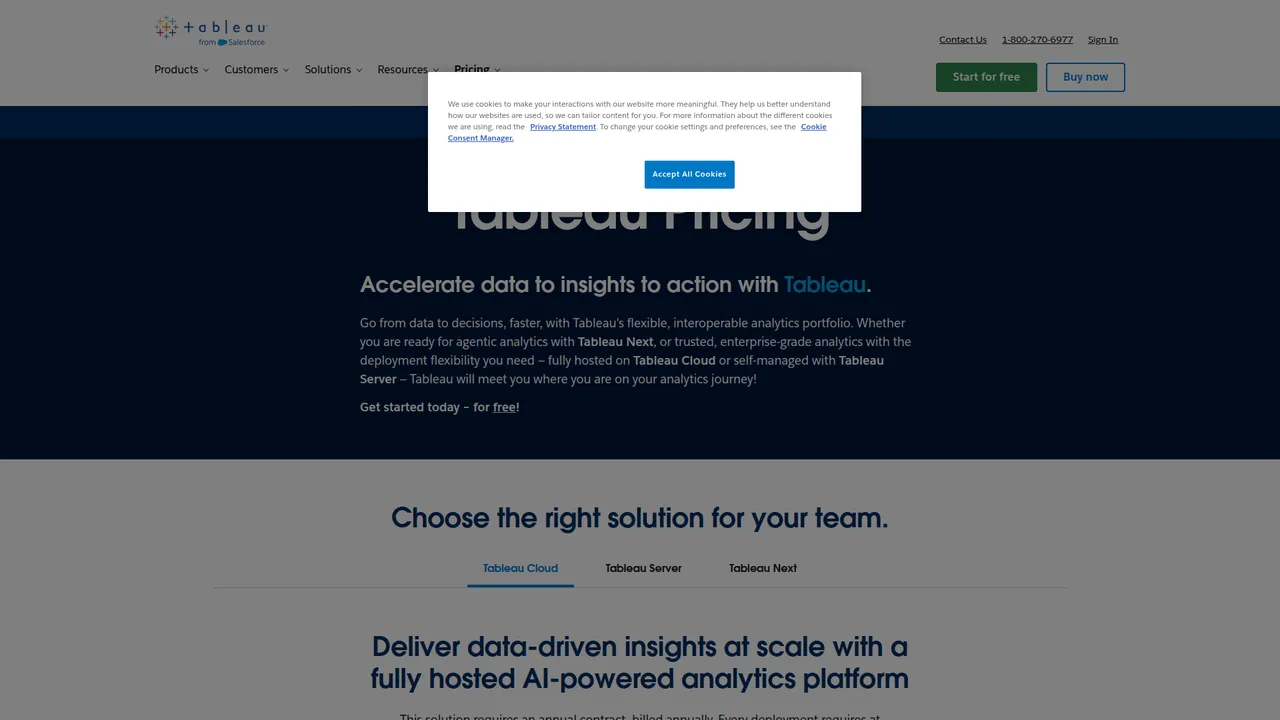
Tableau pricing page, captured from https://www.tableau.com/pricing. Public list pricing shows Standard and Enterprise starting prices.
Second Tableau pricing capture from the same public page. This view shows the role-based licensing detail, which is where the invoice starts to hurt.
Looker review
My score: ~4.1/5 for the right team, ~2.8/5 for the wrong one
| Dimension | Rating |
|---|---|
| Visuals | ⭐⭐⭐☆☆ |
| Self-service | ⭐⭐⭐☆☆ |
| Governance | ⭐⭐⭐⭐⭐ |
| Scalability | ⭐⭐⭐⭐⭐ |
| Pricing | ⭐⭐☆☆☆ |
| Dev friendliness | ⭐⭐⭐⭐☆ |
| Stability | ⭐⭐⭐⭐☆ |
| Data freshness support | ⭐⭐⭐⭐☆ |
| External intelligence fit | ⭐⭐⭐⭐⭐ |
| Average | 4.1/5 right team, 2.8/5 wrong team |
Why serious data teams still buy it
LookML is both the feature and the tax.
If you already run a real warehouse, have dbt or equivalent, and care more about trusted definitions than pretty charts, Looker makes sense.
Google Cloud publishes useful packaging details even though it does not publish simple list pricing:
- Standard includes 10 standard users, 2 developer users, 1,000 query-based API calls/month, and 1,000 admin API calls/month
- Enterprise includes 100,000 query-based API calls/month and 10,000 admin API calls/month
- both editions include ten standard users and two developer users
That API quota detail matters if you want to feed external data into the warehouse and then operationalize it.
Why most teams should not touch it
Looker is not bad. It’s just expensive in the wrong hands.
If your org is still part spreadsheet and part improvisation, you do not need LookML. You need discipline.
Everything has to be put into a data warehouse first, which Looker directly connects to and queries. You have to know LookML, which is another language, to do the modeling and metric creation. Looker usually is the more expensive option.
That is the honest summary.
Packaging screenshot
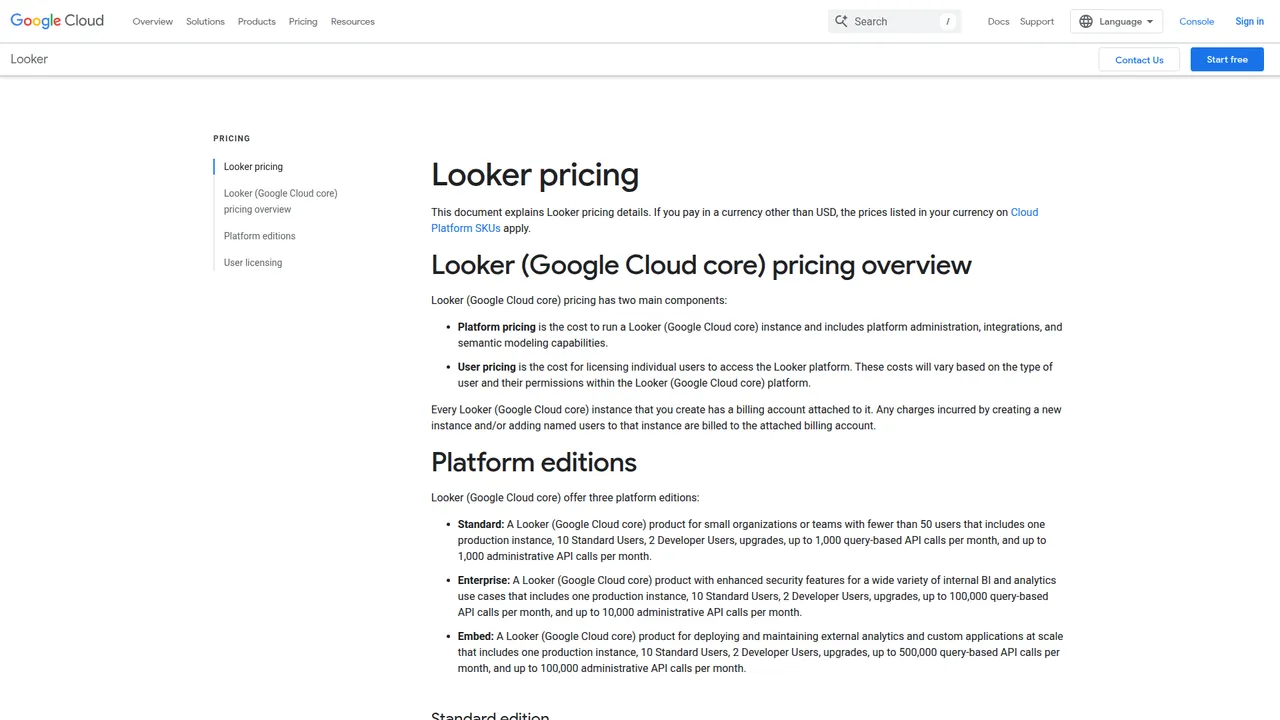
Google Cloud Looker pricing page, captured from https://cloud.google.com/looker/pricing. Google does not publish simple dollar pricing, but it does publish edition entitlements and API quotas.
Qlik review
My score: ~3.9/5
| Dimension | Rating |
|---|---|
| Visuals | ⭐⭐⭐☆ |
| Self-service | ⭐⭐⭐⭐☆ |
| Governance | ⭐⭐⭐⭐☆ |
| Scalability | ⭐⭐⭐⭐☆ |
| Pricing | ⭐⭐⭐☆☆ |
| Dev friendliness | ⭐⭐⭐⭐☆ |
| Stability | ⭐⭐⭐⭐☆ |
| Data freshness support | ⭐⭐⭐⭐☆ |
| External intelligence fit | ⭐⭐⭐⭐☆ |
| Average | 3.9/5 |
Why Qlik deserves more respect
Qlik is the one people forget.
Usually because it doesn’t win the popularity contest.
That has very little to do with product quality.
As a Tableau Developer for more than 6 years, QlikView impressed me. The amount of control it gives to the creator is next level. The pixel-perfect formatting, the ability to write extensive data manipulation scripts and the associative engine.
That is why I keep calling Qlik underrated.
Pricing reality
Qlik publishes actual numbers. Good.
- Starter: $300/month
- Standard: $825/month
- Premium: $2,750/month
- Enterprise: contact sales
Pricing screenshots
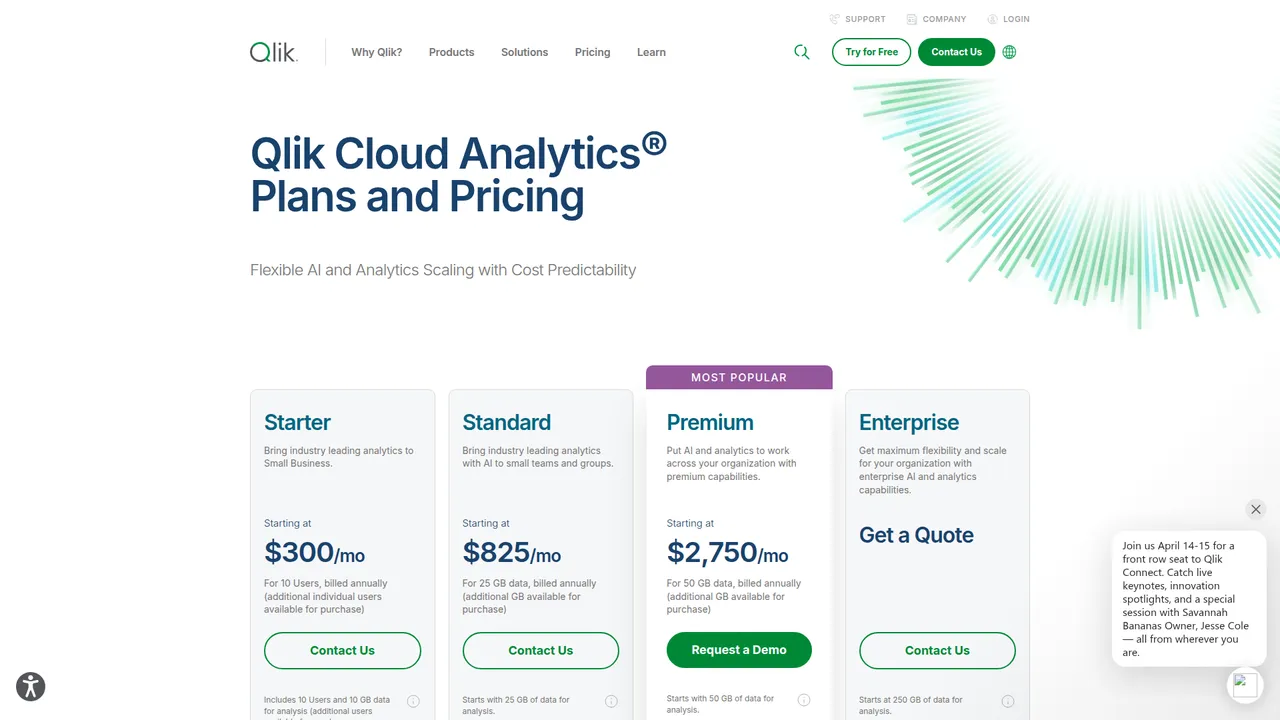
Qlik Cloud Analytics pricing page, captured from https://www.qlik.com/us/pricing. Starter, Standard, Premium, then enterprise quote.
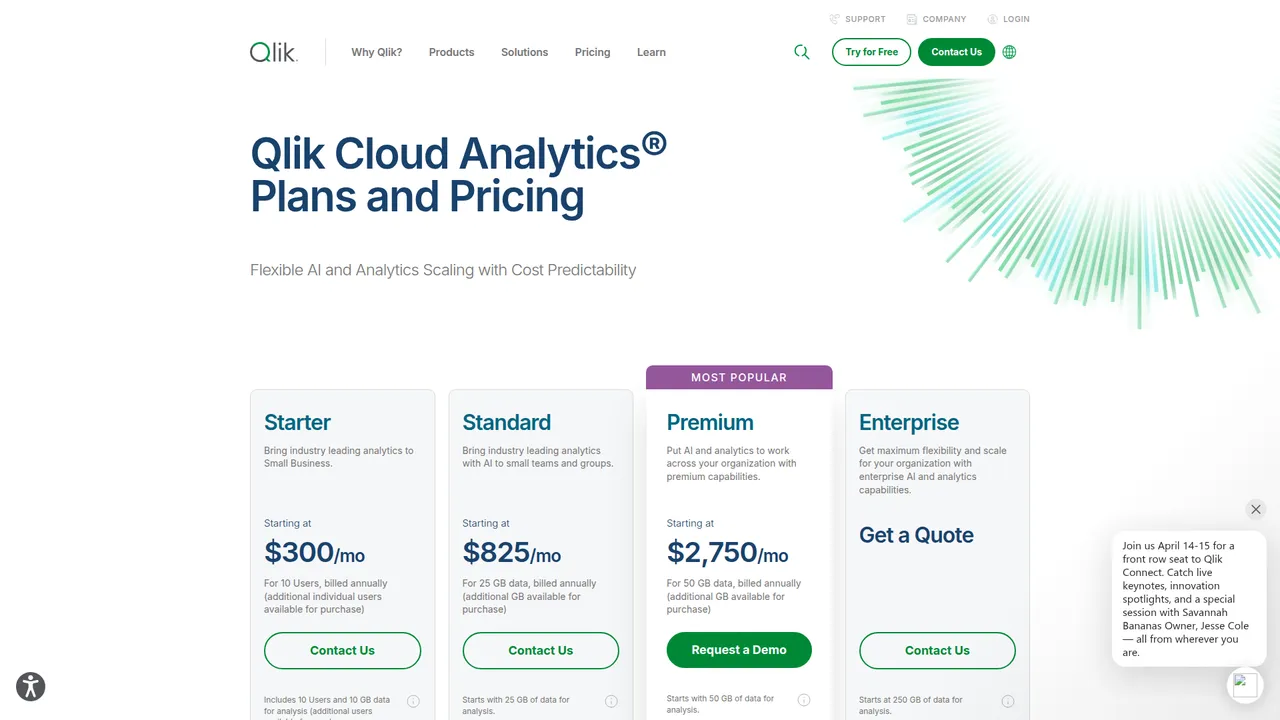
Second Qlik capture from the same public pricing page. This view makes the capacity framing clearer.
Sigma review
My score: ~4.0/5
| Dimension | Rating |
|---|---|
| Visuals | ⭐⭐⭐☆☆ |
| Self-service | ⭐⭐⭐⭐⭐ |
| Governance | ⭐⭐⭐☆☆ |
| Scalability | ⭐⭐⭐⭐☆ |
| Pricing | ⭐⭐☆☆☆ |
| Dev friendliness | ⭐⭐⭐⭐☆ |
| Stability | ⭐⭐⭐⭐☆ |
| Data freshness support | ⭐⭐⭐⭐☆ |
| External intelligence fit | ⭐⭐⭐⭐⭐ |
| Average | 4.0/5 |
Why Sigma feels fresh
Sigma reduces fear.
That sounds small. It isn’t.
The spreadsheet metaphor helps normal business users do more without a ceremony.
My job recently did a POC with Sigma. I loved the product. Significantly easier to do complicated calculations compared to Power BI. I prefer the browser based first BI tools.
The tradeoff nobody mentions
Sigma does not fix a bad model.
It also pushes you into the real warehouse-cost conversation faster than a lot of buyers expect.
Custom pricing does not help.
ThoughtSpot review
My score: ~3.8/5
| Dimension | Rating |
|---|---|
| Visuals | ⭐⭐⭐☆☆ |
| Self-service | ⭐⭐⭐⭐⭐ |
| Governance | ⭐⭐⭐☆☆ |
| Scalability | ⭐⭐⭐⭐☆ |
| Pricing | ⭐⭐☆☆☆ |
| Dev friendliness | ⭐⭐⭐☆☆ |
| Stability | ⭐⭐⭐⭐☆ |
| Data freshness support | ⭐⭐⭐⭐☆ |
| External intelligence fit | ⭐⭐⭐⭐☆ |
| Average | 3.8/5 |
Why it matters
ThoughtSpot matters because most BI adoption problems are friction problems.
If users can ask questions instead of learning a dashboard maze, that helps.
Where it breaks
Search does not rescue broken source data.
If your definitions are weak, the search bar just gets you to bad answers faster.
Domo review
My score: ~3.6/5
| Dimension | Rating |
|---|---|
| Visuals | ⭐⭐⭐☆☆ |
| Self-service | ⭐⭐⭐⭐☆ |
| Governance | ⭐⭐⭐☆☆ |
| Scalability | ⭐⭐⭐⭐☆ |
| Pricing | ⭐⭐☆☆☆ |
| Dev friendliness | ⭐⭐⭐☆☆ |
| Stability | ⭐⭐⭐⭐☆ |
| Data freshness support | ⭐⭐⭐⭐☆ |
| External intelligence fit | ⭐⭐⭐⭐☆ |
| Average | 3.6/5 |
Why people buy it
Domo sells speed.
That’s a real advantage.
Dashboards have been a lot smoother lately with tools I've tried and Domo in particular makes connecting different data sources pretty easy.
In any BI tool, you’ll need to ensure your data is clean, integrated, and curated... Domo has one-click integrations with most CRMs, GA4 and data warehouses like Snowflake. So if you want fastest, find the one with the integrations you need.
Why I’m cautious
If speed is the whole buying case, you are probably skipping a harder conversation about data discipline.
That tends to come back later.
Sisense review
My score: ~3.6/5
| Dimension | Rating |
|---|---|
| Visuals | ⭐⭐⭐☆☆ |
| Self-service | ⭐⭐⭐☆☆ |
| Governance | ⭐⭐⭐☆☆ |
| Scalability | ⭐⭐⭐⭐☆ |
| Pricing | ⭐⭐☆☆☆ |
| Dev friendliness | ⭐⭐⭐⭐☆ |
| Stability | ⭐⭐⭐⭐☆ |
| Data freshness support | ⭐⭐⭐⭐☆ |
| External intelligence fit | ⭐⭐⭐⭐☆ |
| Average | 3.6/5 |
Where Sisense is strong
Sisense is still relevant for embedded analytics.
That is its lane.
Where it gets tricky
If you are not embedding analytics into a product, I usually find a better default elsewhere.
Metabase review
My score: ~3.4/5
| Dimension | Rating |
|---|---|
| Visuals | ⭐⭐☆☆☆ |
| Self-service | ⭐⭐⭐⭐☆ |
| Governance | ⭐⭐☆☆☆ |
| Scalability | ⭐⭐⭐☆☆ |
| Pricing | ⭐⭐⭐⭐⭐ |
| Dev friendliness | ⭐⭐⭐⭐☆ |
| Stability | ⭐⭐⭐☆☆ |
| Data freshness support | ⭐⭐⭐☆☆ |
| External intelligence fit | ⭐⭐⭐⭐☆ |
| Average | 3.4/5 |
Why I like it
Metabase has restraint.
That sounds basic. It’s rare.
Public pricing on the Metabase pricing page:
- Open Source: free
- Starter: $100/month plus $5 per user monthly, or $1080/year plus $65 per user yearly
- Pro: $575/month plus $12 per user monthly, or $6210/year plus $130 per user yearly
- Enterprise: custom pricing, starts at $20k/year
Metabase is open source and great to use.
Where it stops being enough
Heavy governance. Broader semantic control. Polished exec presentation. That’s where Metabase starts to run out of road.
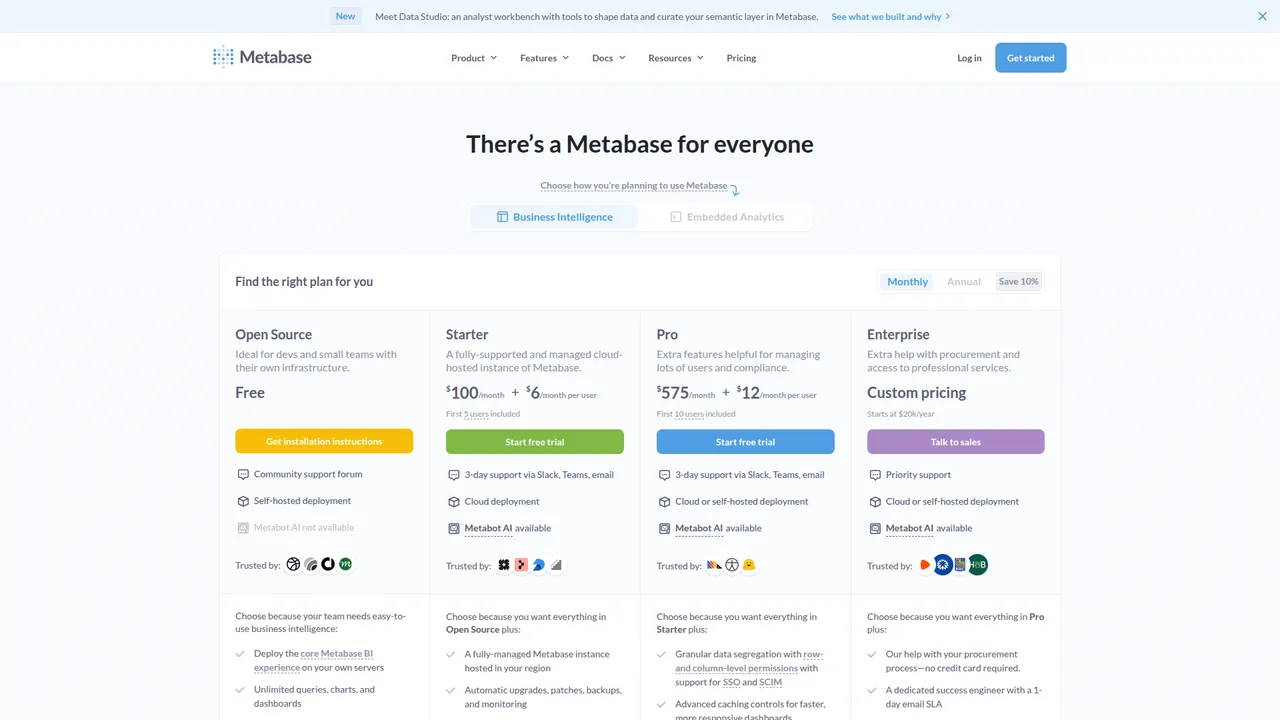
Metabase pricing page, captured from https://www.metabase.com/pricing/. Public pricing is refreshingly explicit, including the point where Enterprise starts at $20k/year.
Zoho Analytics review
My score: ~3.6/5
| Dimension | Rating |
|---|---|
| Visuals | ⭐⭐⭐☆☆ |
| Self-service | ⭐⭐⭐⭐☆ |
| Governance | ⭐⭐⭐☆☆ |
| Scalability | ⭐⭐⭐☆☆ |
| Pricing | ⭐⭐⭐⭐⭐ |
| Dev friendliness | ⭐⭐⭐☆☆ |
| Stability | ⭐⭐⭐☆☆ |
| Data freshness support | ⭐⭐⭐☆☆ |
| External intelligence fit | ⭐⭐⭐☆☆ |
| Average | 3.6/5 |
Why it makes sense
Zoho Analytics makes sense for teams that need sane reporting and do not need prestige.
From the public pricing page I captured, annual cloud pricing is listed in SGD as:
- Basic: S$32/month billed annually
- Standard: S$64/month billed annually
- Premium: S$160/month billed annually
- Enterprise: S$632/month billed annually
Why it is not the answer for everyone
At the top end, this is not where I’d go for the strongest governance or warehouse-native work.
For SMBs, that may not matter.
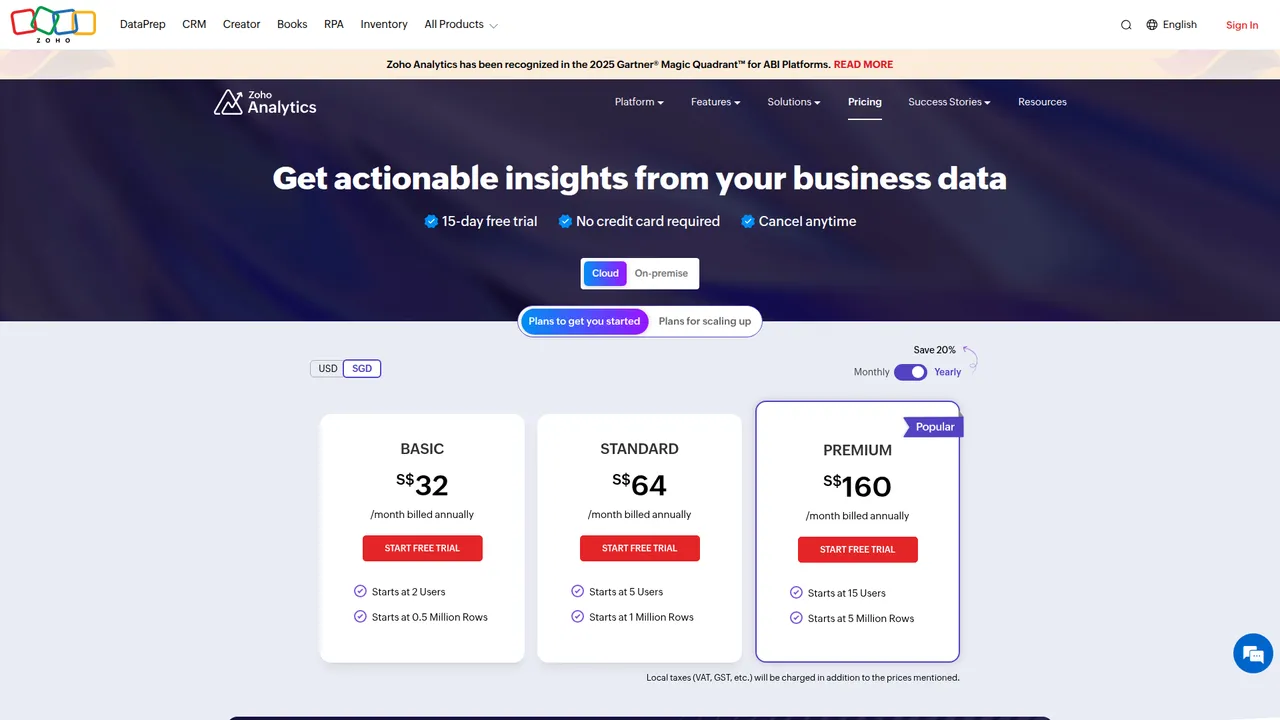
Zoho Analytics pricing page, captured from https://www.zoho.com/analytics/pricing.html. Screenshot shows public annual cloud pricing and plan limits.
Oracle and Cognos quick take
Oracle Analytics
Still relevant in Oracle-heavy environments. Usually not pleasant.
If the rest of your estate is already Oracle, it can be rational.
IBM Cognos
Still alive. Still more likely to be inherited than loved.
If you are doing a fresh mid-market evaluation, this is rarely where I’d start.
SAP and MicroStrategy quick take
SAP BusinessObjects
Still around in SAP-heavy shops. More often inherited than freshly chosen.
MicroStrategy / Strategy
Powerful. Heavy. Usually more than smaller teams need.
This tweet is from the vendor side, so I read it with that in mind. Still, the underlying complaint is real: metric fragmentation and tool sprawl are often the actual problem.
Most organizations are still dealing with fragmented BI stacks, inconsistent definitions, and rising infrastructure costs. The result is slower insights, duplicated work, and missed opportunities. Strategy’s semantic layer, Mosaic, changes that by standardizing metrics, reducing tool sprawl, and creating a governed foundation for analytics and AI.
— Strategy (@MicroStrategy) April 8, 2026
BI data vendors worth adding
This is where a lot of business intelligence platform buyers get it wrong.
They buy a dashboard tool and think they bought business intelligence.
They didn’t.
Why BI buyers get this wrong
A BI platform tells you what happened inside your company.
If you want to know what changed outside your company, you need outside data.
That means things like:
- competitor launches
- customer overlap
- account expansion signals
- org changes
- pricing changes
- funding changes
- intent signals
Without that layer, a lot of BI rollouts are just internal reporting with nicer formatting.
The vendor categories
I’d break the market into a few buckets:
- Company intelligence: NinjaPear, ZoomInfo, Crunchbase
- Sales data / prospecting: Apollo, Cognism, Lead411
- ABM / intent: 6sense, Demandbase
- Data plumbing / orchestration: Clay
- Technographic / context tools: BuiltWith, Similarweb
Quick takes by vendor
NinjaPear
NinjaPear is the one I’d look at when the job is fresh company relationship data plus change monitoring.
It is API-first. That matters.
It turns a company domain into things like:
- customers, investors, and partners
- competitors
- company details and employee count
- company updates
- employee profiles
That is useful if you want to feed a BI stack instead of forcing people to do manual research.
ZoomInfo
Strong brand. Large sales-intelligence footprint. Usually expensive.
Good if you need classic enterprise sales data. Often overbought.
Apollo
Cheaper and easier to access than ZoomInfo. Popular with startups.
Good prospecting tool. Not a full BI data layer.
Crunchbase
Useful for funding and investor context.
Helpful. Not enough by itself.
6sense / Demandbase
Relevant when intent and ABM workflow matter.
Different job from simple enrichment.
Clay
Excellent orchestration layer.
Not your source of truth.
How NinjaPear fits your BI stack
The simple version
A BI platform tells you what happened inside your company. NinjaPear helps tell you what changed outside it.
That is the useful distinction.
What data from NinjaPear can feed BI dashboards
From the public product pages and docs, the obvious inputs are:
- customer listing data for competitor-customer overlap dashboards
- competitor listing data for market mapping
- company updates data for change-monitoring dashboards
- employee / person profile data for org-change tracking
- company details and employee count for segmentation and enrichment
There are also practical details BI teams care about:
- official JS and Python libraries
- bearer-token auth
- backward-compatibility guarantees
- rate limits up to 300 requests/minute
- endpoint response expectations of 30 to 60 seconds
- explicit credit costs on endpoints
That last part matters if you want to wire this into a refresh schedule and not get surprised later.
Example workflows
Power BI + NinjaPear
Use NinjaPear API outputs as a scheduled source for competitor and customer monitoring dashboards.
Tableau + NinjaPear
Use relationship data to build overlap maps and segment heatmaps.
Looker + NinjaPear
Model external company intelligence in the warehouse, then govern it the same way you govern internal data.
Sigma + NinjaPear
Let RevOps or finance explore relationship data in a spreadsheet-like interface.
Why this matters
This is not a forced product mention. It solves a real gap.
Most BI tools are good at internal reporting. They are weak at ingesting market intelligence unless you add another layer.
NinjaPear API
  -> warehouse or connector layer
  -> modeled tables / semantic layer
  -> Power BI / Tableau / Looker / Sigma dashboard
Useful fields to model:
customerscompetitorsemployee_countcompany_updatesperson_profile
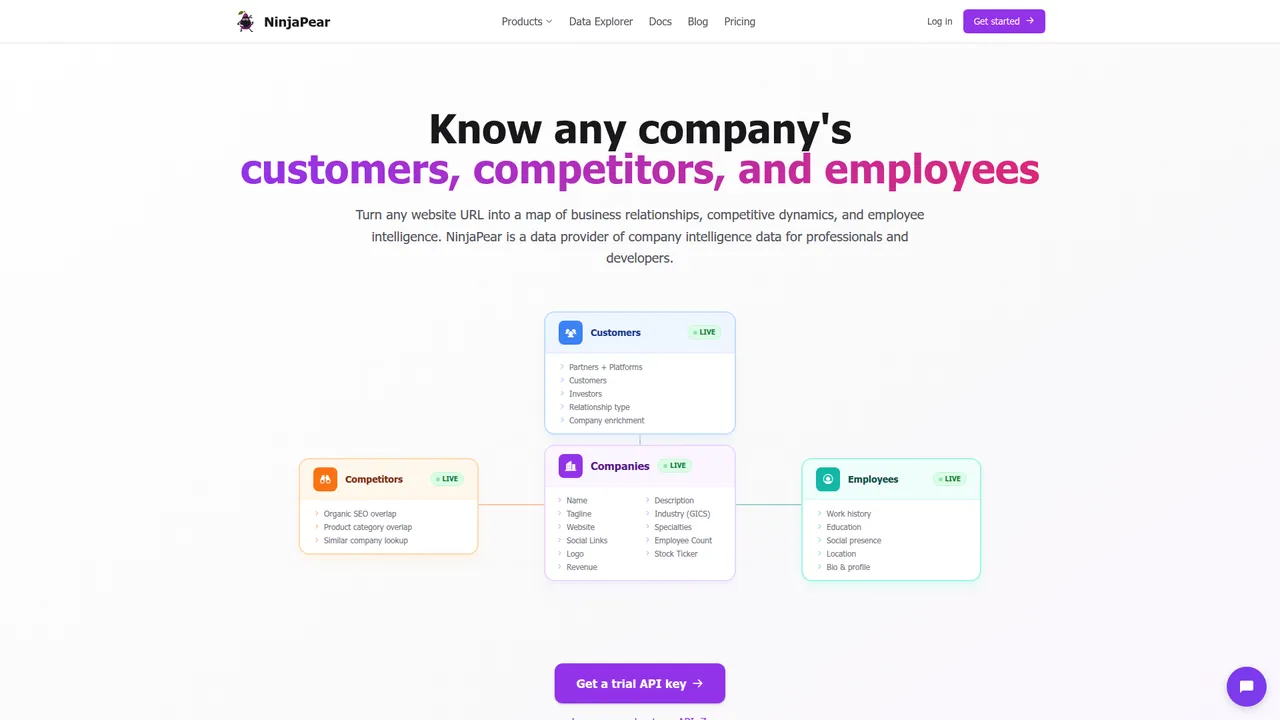
NinjaPear homepage, captured from https://nubela.co/. This is the cleanest quick visual of the product’s customers, competitors, and employees data model.
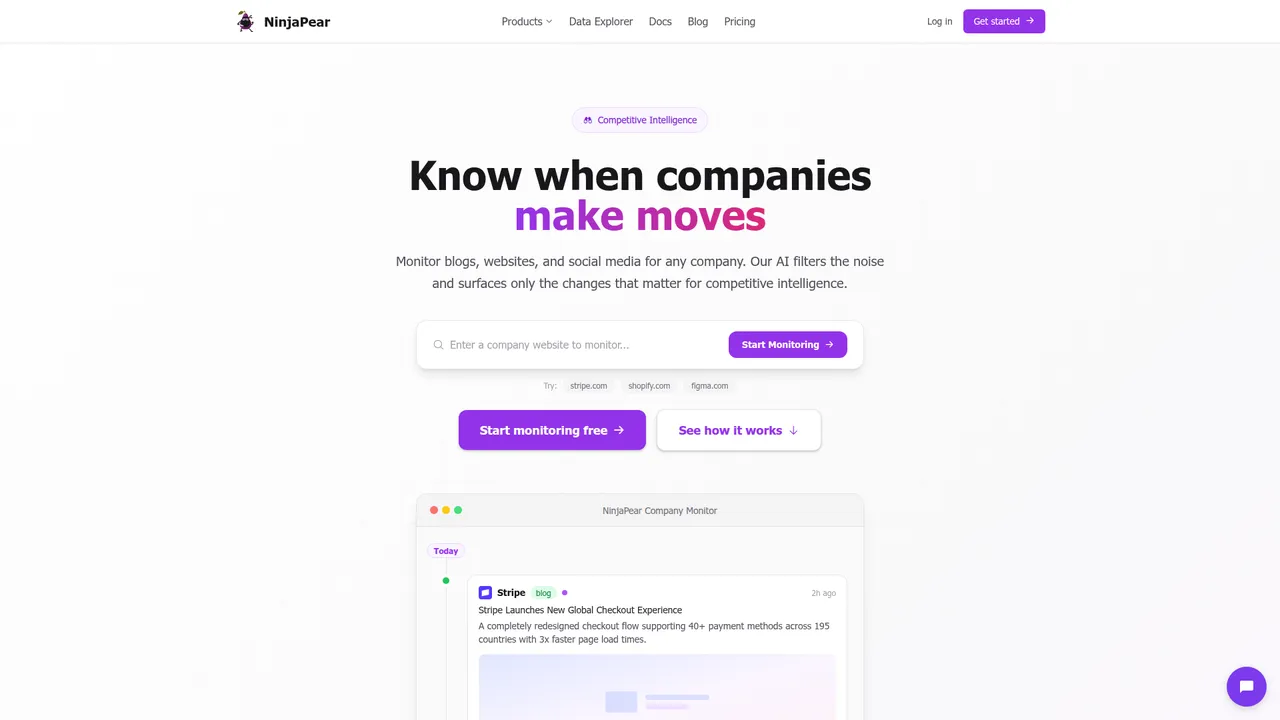
NinjaPear Company Monitor page, captured from https://nubela.co/company-monitor. This is outside-world change data in a form you can actually use.
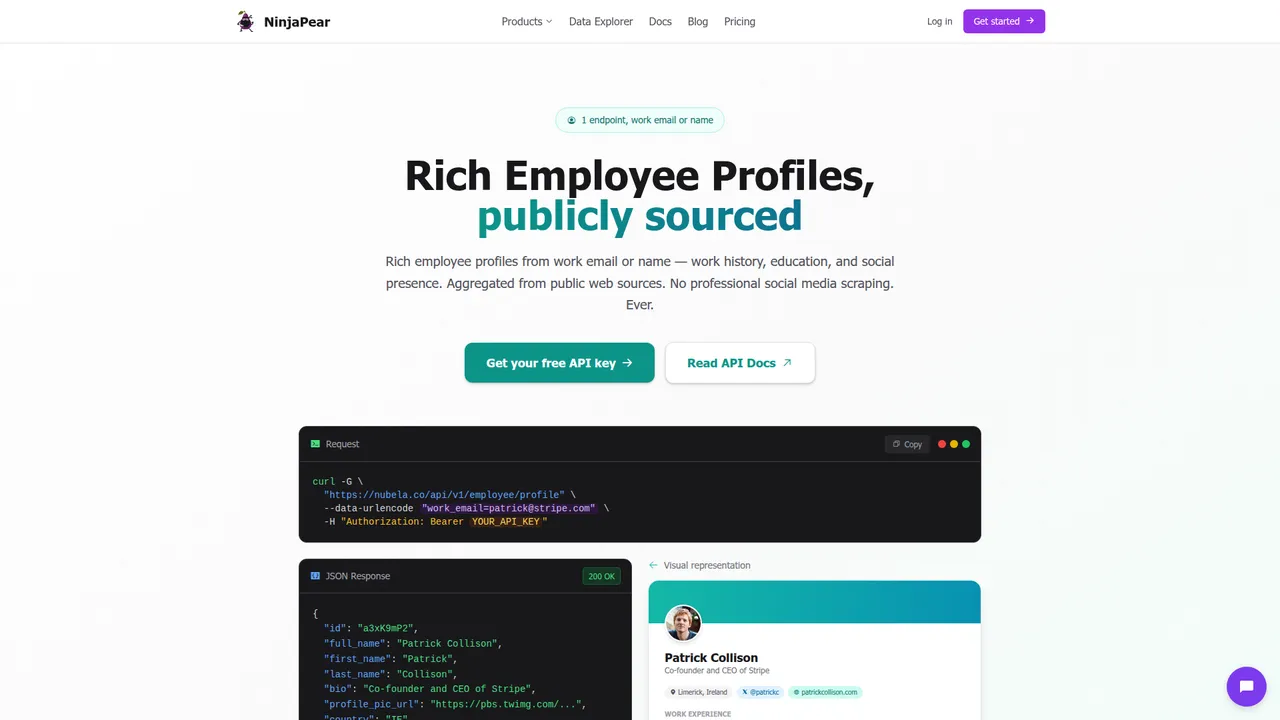
NinjaPear Employee API page, captured from https://nubela.co/employee-api. Publicly sourced person-profile data is useful for org mapping and account intelligence workflows.
Side-by-side scorecard
BI platform comparison table
| Tool | Best for | Worst for | Visuals | Self-service | Governance | Scale | Pricing | Dev friendliness | Stability | External intelligence fit | Average score |
|---|---|---|---|---|---|---|---|---|---|---|---|
| Power BI | Default enterprise buy | Teams that let DAX sprawl unchecked | ⭐⭐⭐⭐☆ | ⭐⭐⭐⭐☆ | ⭐⭐⭐⭐☆ | ⭐⭐⭐⭐☆ | ⭐⭐⭐⭐⭐ | ⭐⭐⭐☆☆ | ⭐⭐⭐⭐☆ | ⭐⭐⭐⭐☆ | 3.9/5 |
| Tableau | Visual analysis | Budget-sensitive dashboard consumption | ⭐⭐⭐⭐⭐ | ⭐⭐⭐⭐☆ | ⭐⭐⭐☆☆ | ⭐⭐⭐⭐☆ | ⭐⭐☆☆☆ | ⭐⭐⭐☆☆ | ⭐⭐⭐⭐☆ | ⭐⭐⭐⭐☆ | 3.7/5 |
| Looker | Governed metrics | Spreadsheet-era orgs | ⭐⭐⭐☆☆ | ⭐⭐⭐☆☆ | ⭐⭐⭐⭐⭐ | ⭐⭐⭐⭐⭐ | ⭐⭐☆☆☆ | ⭐⭐⭐⭐☆ | ⭐⭐⭐⭐☆ | ⭐⭐⭐⭐⭐ | 4.1/5 right fit |
| Qlik | Underrated enterprise BI | Simple seat-based buyers | ⭐⭐⭐⭐☆ | ⭐⭐⭐⭐☆ | ⭐⭐⭐⭐☆ | ⭐⭐⭐⭐☆ | ⭐⭐⭐☆☆ | ⭐⭐⭐⭐☆ | ⭐⭐⭐⭐☆ | ⭐⭐⭐⭐☆ | 3.9/5 |
| Sigma | Warehouse-native self-service | Teams with bad models | ⭐⭐⭐☆☆ | ⭐⭐⭐⭐⭐ | ⭐⭐⭐☆☆ | ⭐⭐⭐⭐☆ | ⭐⭐☆☆☆ | ⭐⭐⭐⭐☆ | ⭐⭐⭐⭐☆ | ⭐⭐⭐⭐⭐ | 4.0/5 |
| ThoughtSpot | Search-first adoption | Weakly governed source data | ⭐⭐⭐☆☆ | ⭐⭐⭐⭐⭐ | ⭐⭐⭐☆☆ | ⭐⭐⭐⭐☆ | ⭐⭐☆☆☆ | ⭐⭐⭐☆☆ | ⭐⭐⭐⭐☆ | ⭐⭐⭐⭐☆ | 3.8/5 |
| Domo | Fast executive rollout | Long-term cost control | ⭐⭐⭐☆☆ | ⭐⭐⭐⭐☆ | ⭐⭐⭐☆☆ | ⭐⭐⭐⭐☆ | ⭐⭐☆☆☆ | ⭐⭐⭐☆☆ | ⭐⭐⭐⭐☆ | ⭐⭐⭐⭐☆ | 3.6/5 |
| Sisense | Embedded analytics | Generic internal BI rollouts | ⭐⭐⭐☆☆ | ⭐⭐⭐☆☆ | ⭐⭐⭐☆☆ | ⭐⭐⭐⭐☆ | ⭐⭐☆☆☆ | ⭐⭐⭐⭐☆ | ⭐⭐⭐⭐☆ | ⭐⭐⭐⭐☆ | 3.6/5 |
| Metabase | Cheap/open source dashboards | Heavy enterprise governance | ⭐⭐☆☆☆ | ⭐⭐⭐⭐☆ | ⭐⭐☆☆☆ | ⭐⭐⭐☆☆ | ⭐⭐⭐⭐⭐ | ⭐⭐⭐⭐☆ | ⭐⭐⭐☆☆ | ⭐⭐⭐⭐☆ | 3.4/5 |
| Zoho Analytics | SMB value | Top-end enterprise scale | ⭐⭐⭐☆☆ | ⭐⭐⭐⭐☆ | ⭐⭐⭐☆☆ | ⭐⭐⭐☆☆ | ⭐⭐⭐⭐⭐ | ⭐⭐⭐☆☆ | ⭐⭐⭐☆☆ | ⭐⭐⭐☆☆ | 3.6/5 |
Data vendor comparison table
| Vendor | Best for | Data freshness | Data richness | Scalability | Pricing sanity | Dev friendliness | Stability | Average score |
|---|---|---|---|---|---|---|---|---|
| NinjaPear | External company intelligence for BI | ⭐⭐⭐⭐⭐ | ⭐⭐⭐⭐☆ | ⭐⭐⭐⭐☆ | ⭐⭐⭐⭐☆ | ⭐⭐⭐⭐⭐ | ⭐⭐⭐⭐☆ | 4.5/5 |
| ZoomInfo | Enterprise sales intelligence | ⭐⭐⭐⭐☆ | ⭐⭐⭐⭐⭐ | ⭐⭐⭐⭐⭐ | ⭐⭐☆☆☆ | ⭐⭐⭐☆☆ | ⭐⭐⭐⭐☆ | 3.8/5 |
| Apollo | Startup-friendly prospecting | ⭐⭐⭐⭐☆ | ⭐⭐⭐☆☆ | ⭐⭐⭐⭐☆ | ⭐⭐⭐⭐☆ | ⭐⭐⭐☆☆ | ⭐⭐⭐⭐☆ | 3.7/5 |
| Crunchbase | Funding and investor context | ⭐⭐⭐☆☆ | ⭐⭐⭐☆☆ | ⭐⭐⭐⭐☆ | ⭐⭐⭐⭐☆ | ⭐⭐⭐☆☆ | ⭐⭐⭐⭐☆ | 3.5/5 |
| 6sense | Intent + ABM orchestration | ⭐⭐⭐⭐☆ | ⭐⭐⭐⭐☆ | ⭐⭐⭐⭐⭐ | ⭐⭐☆☆☆ | ⭐⭐⭐☆☆ | ⭐⭐⭐⭐☆ | 3.7/5 |
| Demandbase | ABM + account signals | ⭐⭐⭐⭐☆ | ⭐⭐⭐⭐☆ | ⭐⭐⭐⭐⭐ | ⭐⭐☆☆☆ | ⭐⭐⭐☆☆ | ⭐⭐⭐⭐☆ | 3.7/5 |
| Clay | Enrichment orchestration | ⭐⭐⭐⭐☆ | ⭐⭐⭐☆☆ | ⭐⭐⭐⭐☆ | ⭐⭐⭐☆☆ | ⭐⭐⭐⭐⭐ | ⭐⭐⭐⭐☆ | 3.8/5 |
| BuiltWith | Technographics | ⭐⭐⭐☆☆ | ⭐⭐⭐☆☆ | ⭐⭐⭐⭐☆ | ⭐⭐⭐⭐☆ | ⭐⭐⭐⭐☆ | ⭐⭐⭐⭐☆ | 3.7/5 |
Costs nobody warns you about
Migration rebuild costs
Switching BI tools is often a rebuild, not a migration.
Power BI and then just blame Microsoft for all the problems that come from “migrating” because you get to rebuild everything.
Funny. Also true.
Budget for rebuild, validation, training, and political fallout. Not just licenses.
Semantic layer upkeep
If nobody owns metric definitions, your BI problem is a trust problem.
That is why Looker can be worth it for the right company. It is also why Power BI can quietly become definition chaos.
Dashboard sprawl
Everyone builds. Nobody deletes. Then nobody trusts anything.
I’ve seen companies with 400+ dashboards and no answer to which 20 matter.
Warehouse spillover
A cheap BI layer on top of expensive warehouse queries is not cheap.
Sigma and Looker buyers should be especially careful here.
Training and adoption
The best tool on paper dies if nobody uses it.
ThoughtSpot can help adoption. Sigma can help adoption. Tableau can hurt adoption if the org mainly needs consumption, not exploration. Power BI often wins on familiarity.
Procurement lock-in
Enterprise BI contracts love annual commitments and vague overage terms.
Public pricing is not the whole truth. But it gives you an anchor.
What I’d buy by company type
Tiny startup
Do not buy an enterprise BI platform just because a demo made you feel small.
My picks:
- Best default: Metabase or Power BI
- If warehouse-native: Sigma
- If outside market data matters more than internal reporting: pair a light BI layer with NinjaPear
10 to 50 person SaaS team
- Best default: Power BI
- Best modern warehouse option: Sigma
- Best if visual storytelling matters: Tableau
- Add NinjaPear if sales or strategy needs competitor/customer intelligence
Mid-market ops team
- Default: Power BI
- Smarter shortlist: Power BI, Qlik, Sigma
- If governance pain is real: Looker
- If embedded or external dashboards matter: Sisense or Domo
Enterprise with governance pain
- Looker or Qlik deserve a serious look
- Power BI works if the org can actually govern it
- Tableau is not a governance shortcut
- Oracle, Cognos, and SAP stay relevant if you are already deep in those estates
- Layer NinjaPear in when executive dashboards need outside-world company intelligence
Final verdict
Here’s my final answer if you’re buying a business intelligence platform in 2026.
- Best default buy: Power BI
- Best visuals: Tableau
- Best for governed metrics: Looker
- Most underrated: Qlik
- Best modern UX: Sigma
- Best for search-first analytics: ThoughtSpot
- Best fast-start executive dashboard option: Domo
- Best open-source budget choice: Metabase
- Best SMB value choice: Zoho Analytics
- Best external company intelligence layer for BI dashboards: NinjaPear
The best business intelligence platform is not the one with the slickest demo. It’s the one your team can still trust, afford, and operate 18 months later.
And if you want actual business intelligence instead of internal reporting cosplay, feed it better outside-world data.
If you’re making this decision now, pick three tools max. Test them on your real seat mix, your real data maturity, and one external-intelligence use case. That will tell you more than ten demos will.
Use it to run seat math, sanity-check hidden costs, score vendor fit, and plan the external-data layer before procurement gets weird.
Download now →
