

If you searched for Crunchbase API, the main thing to understand is simple: Crunchbase Basic is not the full Crunchbase API. Basic gives you 3 endpoints. Full API access requires an Enterprise or Applications license. I also included a public GitHub repo in this guide so you can clone the sample scripts and start testing right away.
I'm a PhD student researching AI startups in Silicon Valley. To get a list of relevant companies, I subscribed to Crunchbase Pro ($99/month), thinking I could export the data... but it turns out exports are disabled for new subscribers since October 7, 2024... So basically, I just wasted $99...
That quote is the whole story in one sentence. People think they bought data access. What they often bought was a much smaller surface area.
Runnable sample scripts for CRM enrichment, prospecting, investor research, account prep, monitoring, and customer-facing product patterns.
git clone https://github.com/NinjaPear-Shares/crunchbase-api-vs-ninjapear-scripts-2026.gitView on GitHub →
What Crunchbase API actually is
Crunchbase’s public API is a read-only REST API. You ask for records. You get JSON back. There is no mystery there.
The public API has three core motions:
- Autocomplete: you have a fuzzy company name and need a canonical match.
- Entity lookup: you know the company and want its record.
- Search: you want a filtered list of companies.
Then there is a richer layer on top of that: related cards and broader entity families in full API access.
If you are building against Crunchbase, most flows look like this:
- resolve a name with
Autocomplete - fetch the company with
Organization Entity Lookup - optionally add related cards like funding rounds, investors, or acquisitions
- repeat at scale with
Search
That is the product, in practical terms.
How access actually works
This part makes more sense once you know the API surface.
Crunchbase Basic
Crunchbase support docs say Basic users can provision an API key.
That is true. It is also easy to overread.
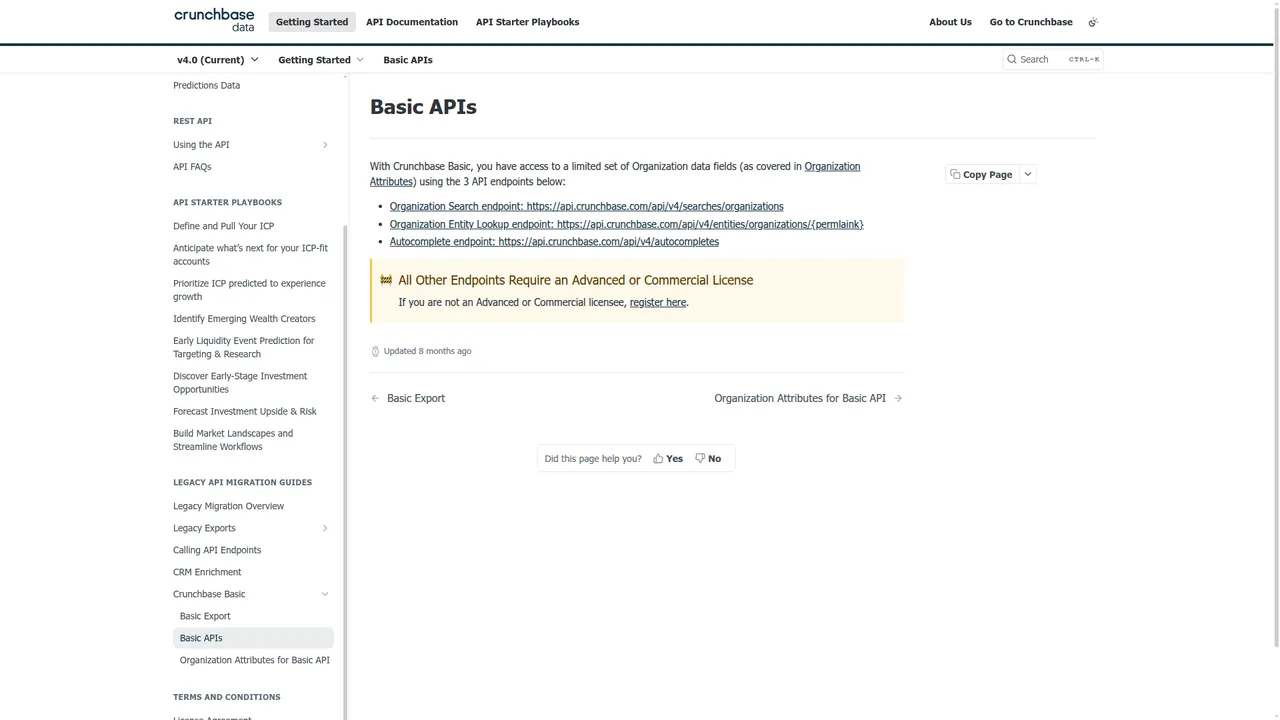
Basic does not mean full API access. It means access to exactly three endpoints:
Organization SearchOrganization Entity LookupAutocomplete
That is enough to test the core workflow.
It is not the same thing as full Crunchbase API access.
Full API access
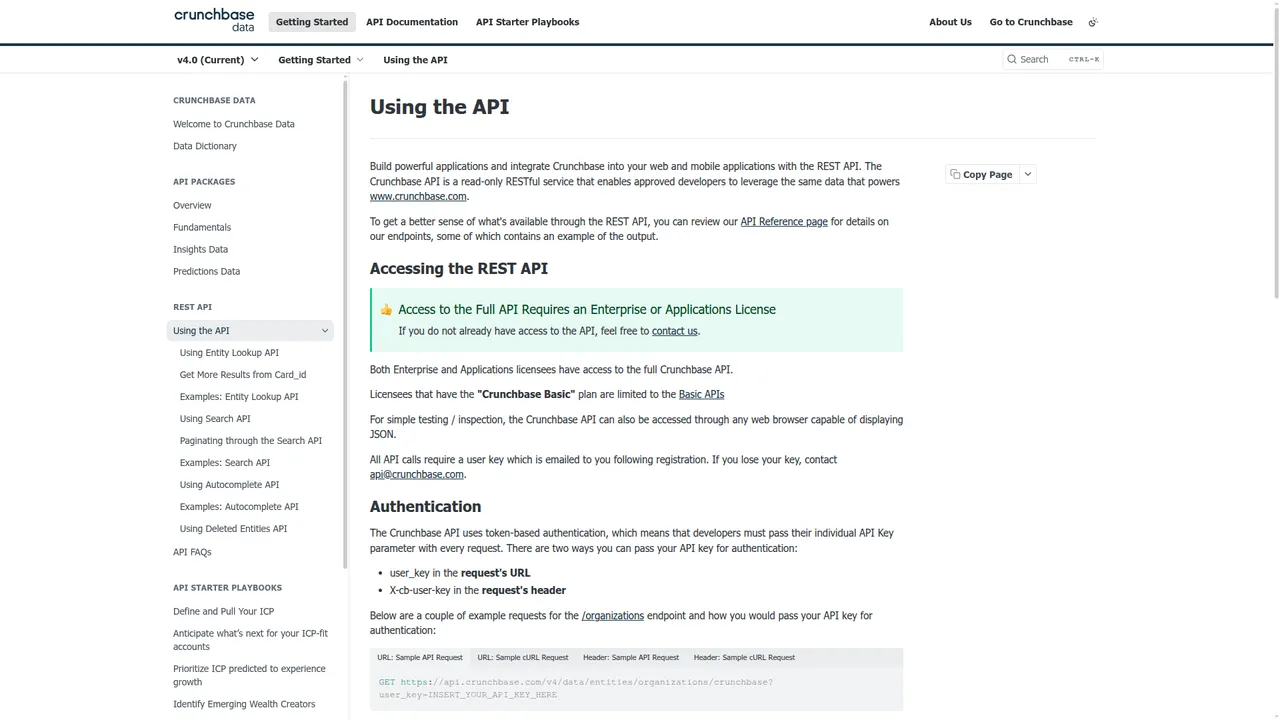
Crunchbase says this directly on the Using the API page:
“Access to the Full API Requires an Enterprise or Applications License.”
That is the line that matters.
If you need broader access than Basic, you are in a licensing motion. Not a normal self-serve checkout motion.
The $99 question
From the public docs in this guide, I cannot say that a $99 Crunchbase plan gives you full API access.
The docs point the other way. Full API access requires Enterprise or Applications licensing.
So if your internal question is:
“Can I pay for a normal Crunchbase plan and get the full API?”
The answer from the public evidence here is: do not assume that.
What happened to Crunchbase? ... Heat points?? Growth score?? I want my visitors per month and average monthly visitors...
Different complaint, same pattern. The disappointment often comes from misunderstanding the boundary.
Auth is simple
To be fair, authentication is not the hard part.
curl 'https://api.crunchbase.com/api/v4/entities/organizations/crunchbase' \
  -H 'X-cb-user-key: YOUR_KEY'
You can pass the API key as:
user_keyin the URLX-cb-user-keyin the header
That part is clean.
Reverse engineering Crunchbase’s internal GraphQL and dashboard API
Short warning: using Crunchbase’s internal dashboard requests instead of the sanctioned API can breach Crunchbase’s terms of service.
Now the useful part.
There are public signs that people do exactly this when they want exports or broader access without proper API licensing:
- Apify actors that ask for a logged-in Crunchbase search URL plus browser cookies
- scraper repos that automate Crunchbase search pages and organization pages
- vendors selling Crunchbase scraping APIs instead of telling you to use the official REST API
That tells you what the real playbook looks like.
The common techniques are usually:
- replay internal authenticated requests from a logged-in browser session
- drive a logged-in browser and extract rendered rows or JSON payloads
The first is cleaner when it works.
How people find the internal requests
The usual workflow is straightforward:
- Log in to Crunchbase in Chrome.
- Open DevTools.
- Go to the Network tab.
- Filter by
fetchorXHR. - Open a Crunchbase search page or company page.
- Look for requests with JSON payloads, GraphQL-style
operationNamefields, or large filter objects. - Right-click the interesting request and copy it as cURL or HAR.
In practice, the requests you see tend to look like one of these:
POSTto a GraphQL endpoint withoperationName,variables, and maybeextensionsPOSTto an internal search endpoint with filters and selected fields in JSONGETwith a large encoded filter blob in the query string
The exact path can change. That is one reason these flows are fragile.
What auth usually looks like
Internal requests often depend on one or more of these:
- session cookies
- CSRF or anti-forgery headers
- request headers like
x-requested-with - a bearer token in browser storage
- a persisted GraphQL query hash
The simplest path is still the practical one:
- log in normally
- copy the working request from DevTools
- replay it before the session expires
That is also why public Apify flows tell users to export cookies.
Sample script: replay a copied GraphQL request
Replace the placeholders below with the values from a real DevTools request you copied from a logged-in Crunchbase session.
import json
import requests

session = requests.Session()

headers = {
    'User-Agent': 'Mozilla/5.0',
    'Accept': 'application/json',
    'Content-Type': 'application/json',
    'Origin': 'https://www.crunchbase.com',
    'Referer': 'https://www.crunchbase.com/',
    'x-csrf-token': 'YOUR_CSRF_TOKEN',
}

cookies = {
    'session': 'YOUR_SESSION_COOKIE',
}

payload = {
    'operationName': 'YOUR_OPERATION_NAME',
    'variables': {
        'page': 1,
        'limit': 50,
        'query': 'fintech',
        'filters': []
    },
    'query': 'YOUR_REAL_QUERY_OR_HASH'
}

r = session.post(
    'https://www.crunchbase.com/graphql',
    headers=headers,
    cookies=cookies,
    data=json.dumps(payload),
    timeout=30,
)

print(r.status_code)
print(r.text[:2000])
Sometimes the endpoint is not literally /graphql. Sometimes the request uses extensions.persistedQuery instead of a raw query string. That is why the right starting point is Copy as cURL, not guessing.
Sample script: start from Copy as cURL
This is usually the fastest route.
- Right-click the working request in DevTools.
- Choose Copy as cURL.
- Paste it somewhere safe.
- Convert it to Python manually or with a converter.
Skeleton:
import requests

url = 'https://www.crunchbase.com/YOUR_REAL_INTERNAL_ENDPOINT'

headers = {
    'accept': 'application/json',
    'content-type': 'application/json',
    'origin': 'https://www.crunchbase.com',
    'referer': 'https://www.crunchbase.com/discover/organization.companies',
    'user-agent': 'Mozilla/5.0',
    'x-csrf-token': 'PASTE_FROM_CURL',
}

cookies = {
    'PASTE_COOKIE_NAME': 'PASTE_COOKIE_VALUE',
}

payload = {
    # paste the real JSON body from the copied request
}

r = requests.post(url, headers=headers, cookies=cookies, json=payload, timeout=30)
print(r.status_code)
print(r.json())
A copied request usually gives you:
- the real URL
- the real headers
- the real cookies
- the real payload shape
That is most of the work.
Sample script: paginate search exports
Once you have one working internal search request, paginating it is usually straightforward because the payload often carries page or offset controls.
import requests
import time

session = requests.Session()

headers = {
    'accept': 'application/json',
    'content-type': 'application/json',
    'origin': 'https://www.crunchbase.com',
    'referer': 'https://www.crunchbase.com/discover/organization.companies',
    'user-agent': 'Mozilla/5.0',
    'x-csrf-token': 'YOUR_CSRF_TOKEN',
}

cookies = {
    'session': 'YOUR_SESSION_COOKIE',
}

base_url = 'https://www.crunchbase.com/YOUR_REAL_INTERNAL_SEARCH_ENDPOINT'
results = []

for page in range(1, 6):
    payload = {
        'operationName': 'YOUR_OPERATION_NAME',
        'variables': {
            'page': page,
            'limit': 50,
            'filters': [],
            'field_ids': ['identifier', 'short_description']
        },
        'query': 'YOUR_REAL_QUERY_OR_HASH'
    }

    r = session.post(base_url, headers=headers, cookies=cookies, json=payload, timeout=30)
    r.raise_for_status()
    data = r.json()
    results.append(data)
    print(f'fetched page {page}')
    time.sleep(2)

print(f'total pages fetched: {len(results)}')
The key idea is simple: copy a working request, then vary only the paging variables.
Sample script: browser automation fallback
If replaying internal requests gets blocked, the common fallback is browser automation on a logged-in session.
That is why public Crunchbase scraping repos often lean on Selenium or remote browsers.
Minimal shape:
from selenium import webdriver
from selenium.webdriver.common.by import By
import time

driver = webdriver.Chrome()
driver.get('https://www.crunchbase.com/login')

print('Log in manually, then press Enter here...')
input()

search_url = 'https://www.crunchbase.com/discover/organization.companies'
driver.get(search_url)
time.sleep(5)

rows = driver.find_elements(By.CSS_SELECTOR, 'grid-row, [role="row"]')
print(f'rows found: {len(rows)}')

for row in rows[:5]:
    print(row.text)

driver.quit()
This is heavier than replaying JSON, but sometimes it is the faster way through a changing frontend.
What usually breaks
The usual failure modes are predictable:
- session cookies expire
- CSRF token rotates
- persisted query hash changes
- GraphQL schema or field names change
- anti-bot checks kick in
- the table UI changes
This is why these workarounds tend to turn into maintenance projects.
Endpoint breakdown
Autocomplete
Endpoint: GET /api/v4/autocompletes
Use this when your input is messy. A user types open ai. A CRM field says stripe inc. You need the canonical entity.
What it gives you:
- suggested matches
- canonical identifiers
- permalinks to feed into lookup calls
Example:
curl 'https://api.crunchbase.com/api/v4/autocompletes?query=stripe' \
  -H 'X-cb-user-key: YOUR_KEY'
This is a helper endpoint. It is not where the interesting data lives. It is what keeps the rest of your pipeline from being garbage.
Organization Entity Lookup
Endpoint: GET /api/v4/entities/organizations/{permalink}
This is the workhorse.
Once you have a valid permalink, this endpoint returns the core organization record. Public docs and examples show fields around:
identifierpermalinkuuidshort_descriptionwebsite- category references
- location references
founded_on- rank fields like
rank_org_company
Trimmed sample response shape based on Crunchbase docs/examples:
{
  "properties": {
    "identifier": {
      "value": "Crunchbase",
      "permalink": "crunchbase",
      "entity_def_id": "organization"
    },
    "short_description": "Crunchbase is a prospecting platform...",
    "rank_org_company": 1234
  }
}
Example:
curl 'https://api.crunchbase.com/api/v4/entities/organizations/crunchbase' \
  -H 'X-cb-user-key: YOUR_KEY'
This is the endpoint you use for:
- CRM enrichment
- internal company profiles
- pre-call research
- startup research
- grounding any workflow in a known company record
Organization Search
Endpoint: POST /api/v4/searches/organizations
This is the list builder.
Use it when you do not know the exact company yet and need a filtered set of organizations.
Crunchbase docs show support for JSON request bodies with things like:
field_idsquery- category filters
- location filters
- funding filters
- employee range enums like
num_employees_enum
The docs also say:
- default page size: 50
- max page size: 1000
That matters if you are bulk-enriching or backfilling data.
Example:
import requests

r = requests.post(
  'https://api.crunchbase.com/api/v4/searches/organizations',
  headers={'X-cb-user-key': 'YOUR_KEY'},
  json={
    'field_ids': ['identifier', 'short_description']
  }
)
print(r.json())
Trimmed sample response shape based on docs/examples:
{
  "entities": [
    {
      "identifier": {
        "value": "Stripe",
        "permalink": "stripe"
      },
      "short_description": "Stripe is a financial infrastructure platform."
    },
    {
      "identifier": {
        "value": "Adyen",
        "permalink": "adyen"
      },
      "short_description": "Adyen is a payments technology company."
    }
  ]
}
This is what you use for:
- prospect list seeding
- startup discovery
- market mapping
- filtered company exports into your own workflows
Related cards
This is where Crunchbase gets more interesting.
Once you have an organization, you can request related cards for richer data. Public examples and docs reference cards around:
- raised funding rounds
- investor participation
- acquisitions
- founder or leadership context
Example:
curl 'https://api.crunchbase.com/api/v4/entities/organizations/openai?card_ids=raised_funding_rounds' \
  -H 'X-cb-user-key: YOUR_KEY'
Trimmed sample response shape:
{
  "cards": {
    "raised_funding_rounds": [
      {
        "identifier": {"value": "Series C"},
        "announced_on": "2023-01-01",
        "money_raised": {"value_usd": 1000000000}
      }
    ]
  }
}
This is the layer that makes Crunchbase useful for investor research and private-market history, not just company pages.
What Crunchbase Basic actually gives you
Crunchbase’s Basic API docs are very clear here.
Basic gives you exactly 3 endpoints:
Organization SearchOrganization Entity LookupAutocomplete
That is enough to test the core workflow.
It is not the same thing as full Crunchbase API access.
That distinction is the first thing I would tell any engineer before they write a single line of integration code.
What data you can realistically pull
This is the endpoint view translated into data jobs.
Company identity
Mostly from:
AutocompleteOrganization Entity Lookup
Useful fields include:
- company name
- permalink
- UUID
- website or domain
- short description
- rank fields
This is your anchor layer.
Firmographic context
Mostly from:
Organization Entity LookupOrganization Search
Useful fields and filters include:
- location
- categories
- founded date
- employee range enums
- company profile context
- funding-related search filters
This is where Crunchbase works well for segmentation and basic enrichment.
Funding and investors
Mostly from:
Organization Entity Lookupwith cards- broader full-API entity relationships when licensed
Useful data includes:
- funding rounds
- announced dates
- amount raised
- investor relationships
- acquisitions context
- private-market history
This is still the main reason to buy Crunchbase.
People and leadership context
Mostly from:
- people-related cards and fuller licensed access
This gives you founder and executive context.
It is useful. It is also not the same thing as GTM-ready people enrichment or contactability.
Discovery support
Mostly from:
Organization SearchAutocomplete
Use these when your question is not “tell me about company X” but “show me companies that fit this shape.”
Crunchbase API pricing
This section is short because public pricing information is short.
What is public
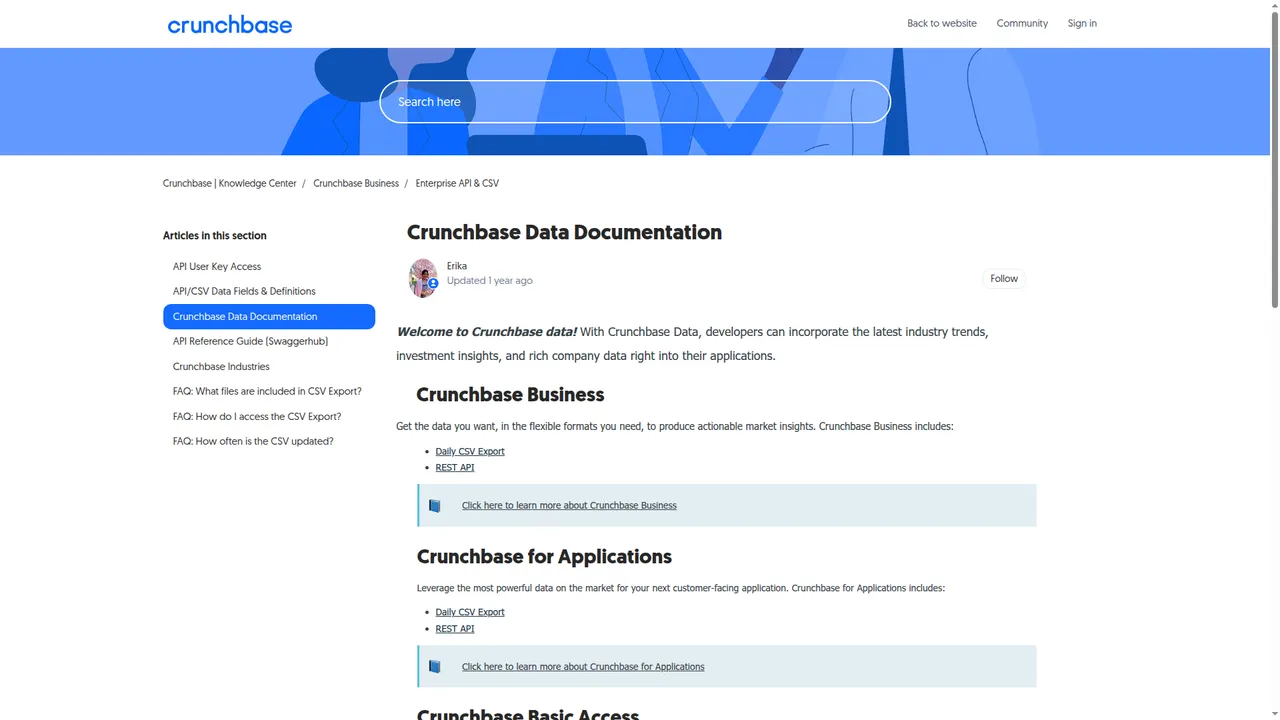
From public docs and support pages, we can verify:
- Basic access exists
- Basic users can provision an API key
- full API requires Enterprise or Applications licensing
- documented rate limit is 200 calls/minute
- API customers get live company data at scale with unlimited exports
- Business plan customers get 5K data exports per month
That tells you Crunchbase treats API customers and UI customers as different commercial tracks.
What is not public
There is no clean public self-serve full API price in the material here.
So if you need full API breadth, the public path points you toward a licensing conversation.
That matters because it changes how engineers test and how teams budget.
Why this matters by buyer type
Founder or builder: this slows cheap experimentation.
RevOps team: this makes budgeting messy.
Enterprise buyer: this is less unusual.
Customer-facing product team: rights matter as much as price.
Most teams think they are buying rows. They are actually buying permission.
PAYG contrast
This is where NinjaPear Pricing is easier to reason about.
Publicly visible right now:
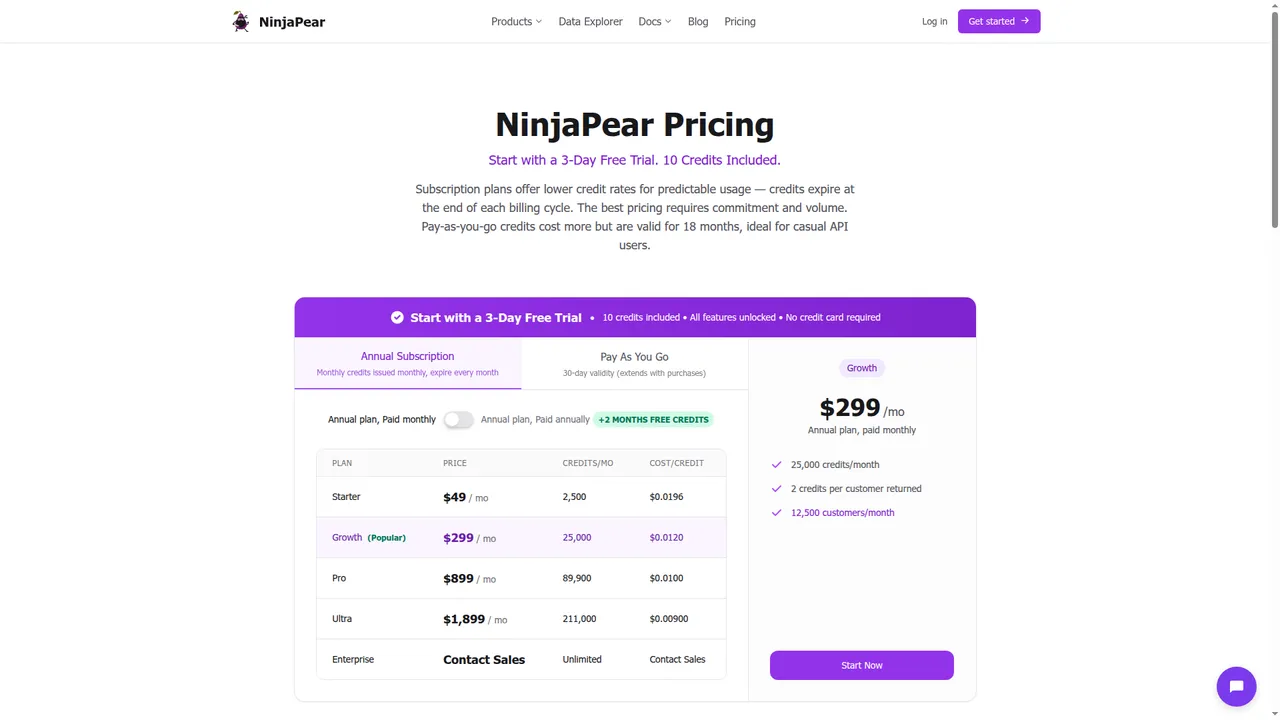
- 3-day free trial
- 10 credits included
- PAYG credits valid for 18 months
- Customer Listing pricing of 1 credit/request + 2 credits/customer returned
On public product pages, NinjaPear also shows:
- Company Details: 2 credits per call
- Employee Count: 2 credits per call
- Company Updates: 2 credits per call
- Company Funding: 2+ credits per call
If you want to run real calls before talking to anyone, that difference matters.
Use case: CRM enrichment
The problem
Your CRM has company names and maybe domains. Reps need enough context to stop guessing.
The minimum viable Crunchbase chain is:
AutocompleteOrganization Entity Lookup- optional funding card if licensed
That gives you identity plus a usable company profile.
Short code snippet
import requests

r = requests.get(
  'https://api.crunchbase.com/api/v4/entities/organizations/stripe',
  headers={'X-cb-user-key': 'YOUR_KEY'}
)
print(r.json())
Sample response
Trimmed sample response shape based on docs/examples:
{
  "properties": {
    "identifier": {
      "value": "Stripe",
      "permalink": "stripe"
    },
    "short_description": "Stripe is a financial infrastructure platform.",
    "website": {"value": "https://stripe.com"},
    "founded_on": {"value": "2010-01-01"}
  }
}
Where it falls short
This is static enrichment. It does not tell you:
- what changed this week
- who buys from them
- who they compete with
- whether sales should care right now
Closest NinjaPear alternative
For this workflow, the closest NinjaPear mapping is:
- Company Details
- Employee Count
- Company Updates if freshness matters
- NinjaPear for Claude if your team wants enrichment inside AI workflows
Use case: prospect list building
The problem
You want a list of companies that match a thesis. Not a bag of random logos.
The Crunchbase chain is:
Organization SearchOrganization Entity Lookup- optional people or funding cards if licensed
Use Search to get the candidate set. Use Entity Lookup to flesh out the winners.
Short code snippet
import requests

r = requests.post(
  'https://api.crunchbase.com/api/v4/searches/organizations',
  headers={'X-cb-user-key': 'YOUR_KEY'},
  json={
    'field_ids': ['identifier', 'short_description']
  }
)
print(r.json())
Where it falls short
A prospect list is not a pipeline list.
You still need:
- timing
- fit
- relationship context
- some reason for now
Closest NinjaPear alternative
This is where Customer API and Competitor API feel more GTM-native:
- Customer API for finding who buys from a company or category player
- Competitor API for adjacency and similar-company discovery
- Company Details for enrichment after discovery
Use case: investor research
The problem
You need startup, round, investor, and acquisition context fast.
This is where Crunchbase is strongest.
The typical chain is:
Organization Entity Lookup- funding-related cards
- investor-related cards
- acquisition cards where relevant
Short code snippet
curl 'https://api.crunchbase.com/api/v4/entities/organizations/openai?card_ids=raised_funding_rounds' \
  -H 'X-cb-user-key: YOUR_KEY'
Sample response
Trimmed sample response shape based on docs/examples:
{
  "cards": {
    "raised_funding_rounds": [
      {
        "identifier": {"value": "Series C"},
        "announced_on": "2023-01-01",
        "money_raised": {"value_usd": 1000000000}
      }
    ]
  }
}
My take
Crunchbase wins here.
If funding data is the job, this is where it is strongest.
Where NinjaPear fits instead
Use NinjaPear when the question changes from:
- “who raised?” to
- “what changed?”
- “who are their customers?”
- “who competes with them?”
- “should sales care now?”
Closest mappings:
- Company Funding
- Company Updates
- Customer API
- Competitor API
Use case: account research
The problem
A rep has a meeting tomorrow and wants context that is useful.
The Crunchbase chain is:
AutocompleteOrganization Entity Lookup- optional people or funding cards if licensed
That gives you a decent pre-call brief.
What it misses
Usually the actual trigger to act.
That might be:
- a pricing page change
- a product launch post
- expansion hiring
- customer adjacency
- competitor overlap
Closest NinjaPear alternative
Stronger fit here:
- Company Monitor
- Monitor API
- Employee API
- Customer Listing
- Competitor API
Short NinjaPear snippet
curl -G 'https://nubela.co/api/v1/customer/listing' \
  --data-urlencode 'website=https://stripe.com' \
  -H 'Authorization: Bearer YOUR_API_KEY'
Sample response
Trimmed sample response shape based on public docs:
{
  "company": "Stripe",
  "customers": [
    {
      "company_name": "Shopify",
      "website": "shopify.com",
      "relationship_type": "customer"
    },
    {
      "company_name": "Lyft",
      "website": "lyft.com",
      "relationship_type": "customer"
    }
  ]
}
Use case: watchlists and monitoring
The problem
You do not want a static company record. You want to know when the company moves.
From the public Crunchbase materials in this guide, the API is not positioned as a blog, X, and website monitoring product.
You can build repeated search and repeated lookup flows. That is not the same thing as a first-class monitoring system.
Why this matters
For GTM, timing beats trivia.
Closest NinjaPear alternative
This is where Company Monitor is the better fit:
- Monitor API
- Company Updates
- AI-filtered changes across blog, website, and X
Short workflow snippet
Create feed in NinjaPear Monitor API -> poll RSS/API -> push meaningful changes to Slack or CRM
Sample output
<item>
  <title>Stripe: New Checkout Experience for Global Payments</title>
  <category>blog</category>
  <pubDate>Thu, 27 Feb 2026 10:00:00 GMT</pubDate>
</item>
Use case: customer-facing products
The problem
You want to put company data inside your own product.
This is where data buying turns into rights buying.
Crunchbase explicitly separates:
- Data Enrichment, for internal workflows
- Data Licensing, for customer-facing products
The catch
Before you ship anything, ask:
- can I display this data to my users?
- do I need attribution?
- do links need to be visible and spiderable?
- can I redistribute raw data?
- what happens if the contract ends?
Closest NinjaPear alternative
NinjaPear is cleaner here when the buyer wants:
- self-serve testing first
- PAYG motion
- AI-agent docs
- customer, competitor, employee, and monitoring data in one stack
Still, read the terms.
Workflow pricing cards
I am not going to make up Crunchbase numbers that are not public. So here is the honest version.
CRM enrichment
| Field | Crunchbase | NinjaPear |
|---|---|---|
| Problem | Enrich 500 CRM accounts with company context | Enrich 500 CRM accounts with company context |
| Crunchbase endpoints needed | Autocomplete → Organization Entity Lookup | N/A |
| Crunchbase access motion | Basic may cover starter org enrichment | N/A |
| Crunchbase public price? | Basic exists, public full API price not shown | N/A |
| NinjaPear endpoints needed | N/A | Company Details, optional Employee Count |
| NinjaPear known credit math? | N/A | Company Details shows 2 credits/call |
| Best practical takeaway | Start with Basic if you only need basic org fields. If you need broader cards or product embedding, expect a licensing conversation. | Good fit if you want to test immediately and care about fresh company details. |
Prospect list building
| Field | Crunchbase | NinjaPear |
|---|---|---|
| Problem | Build a list of target companies | Build a target list from customer or competitor adjacency |
| Crunchbase endpoints needed | Organization Search → Organization Entity Lookup | N/A |
| Crunchbase access motion | Basic for starter workflow | N/A |
| Crunchbase public price? | Full API price not public | N/A |
| NinjaPear endpoints needed | N/A | Customer Listing / Competitor API / Company Details |
| NinjaPear known credit math? | N/A | 1 credit/request + 2 credits/customer returned for Customer Listing |
| Best practical takeaway | Great for startup discovery by firmographic or funding filters. | Better when the list needs to be commercially actionable, not just broad. |
Investor research
| Field | Crunchbase | NinjaPear |
|---|---|---|
| Problem | Research funding history and investors | Pull funding plus adjacent company context |
| Crunchbase endpoints needed | Org Lookup → funding cards → investor cards | N/A |
| Crunchbase access motion | Full API likely for real depth | N/A |
| Crunchbase public price? | Custom / sales quote required | N/A |
| NinjaPear endpoints needed | N/A | Company Funding |
| NinjaPear known credit math? | N/A | Partial, public page says 2+ credits/call |
| Best practical takeaway | Crunchbase wins this workflow. | Useful adjacent layer, not a full replacement. |
Account research
| Field | Crunchbase | NinjaPear |
|---|---|---|
| Problem | Prep for a meeting | Prep for a meeting with GTM context |
| Crunchbase endpoints needed | Autocomplete → Org Lookup | N/A |
| Crunchbase access motion | Basic can start | N/A |
| Crunchbase public price? | Full API price not public | N/A |
| NinjaPear endpoints needed | N/A | Customer Listing, Company Updates, Employee API |
| NinjaPear known credit math? | N/A | Partial |
| Best practical takeaway | Good baseline profile lookup. | Better if the rep needs what changed and why now. |
Watchlists and monitoring
| Field | Crunchbase | NinjaPear |
|---|---|---|
| Problem | Watch a set of target companies | Monitor meaningful company changes |
| Crunchbase endpoints needed | Repeated search / repeated lookup | N/A |
| Crunchbase access motion | Not clearly positioned as monitoring in public docs | N/A |
| Crunchbase public price? | No monitoring pricing path visible in reviewed docs | N/A |
| NinjaPear endpoints needed | N/A | Monitor API / Company Updates |
| NinjaPear known credit math? | N/A | Partial, plus blog scenario examples |
| Best practical takeaway | This is not Crunchbase’s strongest job from public docs. | Better fit. |
Customer-facing products
| Field | Crunchbase | NinjaPear |
|---|---|---|
| Problem | Put company data in your app | Put company intelligence in your app |
| Crunchbase endpoints needed | Search / Lookup / cards / licensing review | N/A |
| Crunchbase access motion | License required territory | N/A |
| Crunchbase public price? | Custom / sales quote required | N/A |
| NinjaPear endpoints needed | N/A | Depends on endpoint mix |
| NinjaPear known credit math? | N/A | Partial |
| Best practical takeaway | This is a rights problem as much as a data problem. | Better for quick prototyping, but always review terms before shipping. |
A numeric NinjaPear example we can actually do
Finding customers for 100 target vendors
Known from public pricing:
- base requests:
100 x 1 credit = 100 credits - if average returned customers =
10/company, returned records =100 x 10 x 2 credits = 2,000 credits - total = 2,100 credits
The 10/company value is an assumption for illustration. It is not a measured benchmark.
Rate limits and gotchas
200 calls per minute
Crunchbase docs say 200 calls per minute.
That is fine for:
- individual lookups
- modest enrichment jobs
- basic search flows
It gets more annoying for:
- large backfills
- multi-tenant apps
- workflows that fan out across cards and related entities
The real bottleneck is often not RPM
Usually it is one of these:
- access tier limits
- export restrictions
- attribution restrictions
- procurement delays
Most teams think they are buying rows. They are actually buying permission.
Attribution and licensing
This is one of the highest-value parts of the whole guide.
Internal use is the safe default
Crunchbase says:
“We encourage you to leverage the API for your internal business and research needs.”
That is the safe default.
Attribution rules matter
Crunchbase says attribution must:
- include a hyperlink to Crunchbase
- point to the entity page if the content is primarily about one entity
- be plainly visible to the end user
- be in close proximity to the data
- be visible to spiders
- not include
nofollow
That is not a legal footnote. That is product behavior.
Why this becomes a product problem
Attribution affects:
- UI layout
- SEO behavior
- display logic
- distribution rights
- how native the data feels inside your app
NinjaPear alternatives by endpoint
Here is the cleanest mapping I can give without pretending the products are identical.
| Crunchbase endpoint family | Typical job | NinjaPear alternative | Mapping type |
|---|---|---|---|
| Organization Lookup | CRM enrichment | Company Details | Direct |
| Organization Search | Prospecting | Competitor API / Customer API / Company Details | Partial |
| People Lookup | Account research | Employee API / Person Profile Endpoint | Partial |
| Funding data | Investor research | Company Funding + Company Details | Partial |
| Acquisition data | Market change tracking | Company Updates / Monitor API | Better adjacent |
| Search | Company discovery | Competitor API / Customer API | Partial |
| Autocomplete | UI helper | Internal resolver on Company Details | Adjacent |
| Insights / Predictions | Prioritization | Monitor API + Updates + Claude workflows | Better adjacent |
Notes:
- be honest when the mapping is not 1:1
- Crunchbase wins on deep private-market funding context
- NinjaPear wins when the workflow is GTM, monitoring, customer graphing, competitor mapping, or AI-native use
Who should use what
Use Crunchbase if
- you care most about funding and investors
- you do private-market research
- you are in VC, PE, corp dev, or startup strategy
- you can live with sales-led access for full API needs
Use NinjaPear if
- you need PAYG access now
- you want to test before you commit
- you care about customers, competitors, employees, and company updates
- you want to work inside Claude or AI-agent tooling
Use both if
- you genuinely need funding depth and GTM actionability
- research and sales both touch the same accounts
- one team cares about private-market graph data and another cares about timing
Crunchbase vs NinjaPear scorecard
| Factor | Crunchbase | NinjaPear | Winner |
|---|---|---|---|
| Funding depth | ⭐⭐⭐⭐☆ | ⭐⭐⭐☆☆ | Crunchbase |
| Pricing clarity | ⭐☆☆☆☆ | ⭐⭐⭐⭐☆ | NinjaPear |
| Self-serve access | ⭐☆☆☆☆ | ⭐⭐⭐⭐☆ | NinjaPear |
| Customer graph | ⭐⭐☆☆☆ | ⭐⭐⭐⭐☆ | NinjaPear |
| Competitor graph | ⭐⭐☆☆☆ | ⭐⭐⭐⭐☆ | NinjaPear |
| Live updates | ⭐⭐☆☆☆ | ⭐⭐⭐⭐☆ | NinjaPear |
| AI workflow fit | ⭐⭐⭐☆☆ | ⭐⭐⭐⭐⭐ | NinjaPear |
| Overall score | 2.29/5 | 4.14/5 | NinjaPear |
| Dimension | Crunchbase | NinjaPear | My take |
|---|---|---|---|
| Funding depth | ⭐⭐⭐⭐☆ | ⭐⭐⭐☆☆ | Crunchbase wins for investor-grade funding context. |
| Pricing clarity | ⭐☆☆☆☆ | ⭐⭐⭐⭐☆ | Full API pricing opacity is a real tax on builders. |
| Self-serve access | ⭐☆☆☆☆ | ⭐⭐⭐⭐☆ | NinjaPear’s free trial + PAYG is much easier to test. |
| Customer graph | ⭐⭐☆☆☆ | ⭐⭐⭐⭐☆ | NinjaPear is built for this. |
| Competitor graph | ⭐⭐☆☆☆ | ⭐⭐⭐⭐☆ | Same story. |
| Live updates | ⭐⭐☆☆☆ | ⭐⭐⭐⭐☆ | Monitoring is not Crunchbase’s center of gravity. |
| AI workflow fit | ⭐⭐⭐☆☆ | ⭐⭐⭐⭐⭐ | Claude + AI-agent docs is a real advantage. |
| GTM usefulness | ⭐⭐☆☆☆ | ⭐⭐⭐⭐☆ | For pipeline work, NinjaPear is usually the better first call. |
| Developer friction | ⭐⭐⭐☆☆ | ⭐⭐⭐⭐☆ | Crunchbase auth is fine, access motion is the bigger issue. |
Average score: Crunchbase 2.44/5, NinjaPear 4.11/5.
Final verdict
Use Crunchbase when funding data is the job. Use NinjaPear when GTM intelligence is the job. Use both only if you genuinely need both layers.
If I were evaluating the Crunchbase API from scratch in 2026, I would do it in this order:
- test whether Basic’s 3 endpoints already cover the workflow
- confirm whether the real job is funding research or GTM actionability
- if it is funding, keep pushing on Crunchbase
- if it is GTM, monitoring, customer graphs, competitor graphs, or AI-native workflows, test NinjaPear first because the feedback loop is shorter
And if you want the practical version, not another API explainer, clone the repo and start with the scripts. That will tell you more in an hour than most comparison pages will tell you in a week.
