

Should You Pay for BuiltWith?
Answer four blunt questions. Get a blunt answer. This widget is for people searching builtwith who are really asking: should this be a real line item on my budget?
I’ve watched smart teams burn a very stupid amount of money on BuiltWith because they confused a CSV of websites with actual pipeline.
That’s the whole review in one sentence.
BuiltWith is real. It’s useful. It has legitimate depth. It is also one of those tools that gets overbought by people who need “accounts + contacts + timing + prioritization” and end up paying for “websites that appear to use X.” Those are not the same thing. Not even close.
I’m writing this as someone who has signed the software checks, cleaned up the fallout, and had to explain to a founder why a list of 40,000 domains turned into a few hundred verified contacts and a lot of wasted SDR hours. That distinction matters.
TL;DR
If you just want the adult answer, here it is.
| Factor | BuiltWith | Wappalyzer | Ful.io | Winner |
|---|---|---|---|---|
| Best for one-off lookup | ⭐⭐⭐⭐☆ | ⭐⭐⭐⭐⭐ | ⭐⭐⭐⭐☆ | Wappalyzer |
| Best for narrow technographic prospecting | ⭐⭐⭐⭐☆ | ⭐⭐⭐☆☆ | ⭐⭐⭐⭐☆ | BuiltWith |
| Historical tech trend depth | ⭐⭐⭐⭐⭐ | ⭐⭐⭐☆☆ | ⭐⭐⭐☆☆ | BuiltWith |
| Entry pricing sanity | ⭐⭐☆☆☆ | ⭐⭐⭐⭐☆ | ⭐⭐⭐⭐☆ | Ful.io |
| Team workflow viability | ⭐⭐⭐☆☆ | ⭐⭐⭐⭐☆ | ⭐⭐⭐☆☆ | Wappalyzer |
| API practicality | ⭐⭐⭐☆☆ | ⭐⭐⭐⭐☆ | ⭐⭐⭐☆☆ | Wappalyzer |
| Useful beyond front-end tech detection | ⭐⭐☆☆☆ | ⭐⭐☆☆☆ | ⭐⭐☆☆☆ | None of them |
| “Ready-to-run pipeline” out of the box | ⭐⭐☆☆☆ | ⭐⭐⭐☆☆ | ⭐⭐⭐☆☆ | None of them |
| Overall score | 3.17/5 | 3.92/5 | 3.67/5 | Wappalyzer |
My quick read:
- Buy BuiltWith if your ICP is tightly anchored to 1-2 technologies, or you care about historical adoption/migration data enough to monetize it.
- Use free lookup / cheaper alternatives if you’re a solo operator doing ad hoc research.
- Do not buy BuiltWith if what you really need is contacts, buying intent, org changes, or account prioritization.
- All the front-end scanners share the same structural limitation: they mainly infer from the public website surface. That is useful. It is not the same as understanding customers, relationships, or timing.
- A CSV of websites is not pipeline. Stop pretending otherwise.
The CEO verdict: should you pay for BuiltWith at all?
Yes. In exactly two situations.
Not five. Not “it depends.” Two.
The 2 situations where I’d approve budget
1. You have a narrow ICP defined by specific technologies.
If I’m selling into, say, Shopify Plus stores running Klaviyo with a certain spend profile and I can monetize that list fast, BuiltWith can absolutely print money. That’s because its tech coverage is broad, its filtering is serious, and its exportability is actually useful when you already know the hunt.
2. You care about historical adoption trends enough to make money from them.
This is the part people underrate. Investors, analysts, strategy teams, ecosystem partners — these people can get real value from seeing who adopted, dropped, or migrated over time. BuiltWith’s homepage mentions trends, but honestly that undersells the strategic value of the historical layer.
The situations where I’d say no
Solo founders doing occasional lookups. Use the free lookup or pay for something lighter.
Teams expecting contact data and ready-to-run outbound lists. BuiltWith does not magically turn websites into reachable people.
Companies confusing technographics with buying intent. This is the big self-own. A company using HubSpot is not automatically in market. A company using Shopify is not automatically a good customer. A company changing leadership, hiring for a replatform, launching a new product line, or ripping up its pricing page? Now we’re getting somewhere.
My verdict is simple: BuiltWith deserves budget when the use case is brutally specific. Otherwise it becomes expensive software theater.
BuiltWith Scorecard
Here’s the scorecard I’d hand to a CEO or RevOps lead.
| Category | Rating | CEO note |
|---|---|---|
| Data freshness | ⭐⭐⭐☆☆ | Useful, but I would still validate high-value accounts before outreach |
| Data richness | ⭐⭐⭐⭐☆ | Broad coverage and decent metadata beyond simple script detection |
| Scalability | ⭐⭐⭐☆☆ | Scales, but not infinitely and not without workflow design |
| Pricing | ⭐⭐☆☆☆ | Entry plan feels more like a teaser than a serious operating plan |
| Developer friendliness | ⭐⭐⭐☆☆ | Usable docs, but engineering still has to care |
| Stability | ⭐⭐⭐⭐☆ | Established product, not some sketchy side project |
| Beyond front-end visibility | ⭐⭐☆☆☆ | Like Wappalyzer and peers, it mainly sees what the public site reveals |
| Overall | 3.17/5 | Good product, easy to overbuy |
That last line is the whole thing.
Good product. Easy to overbuy.
What BuiltWith is actually good at
I want to give the tool real credit before I start swinging at its budget logic.
Breadth of technology coverage is legitimately strong
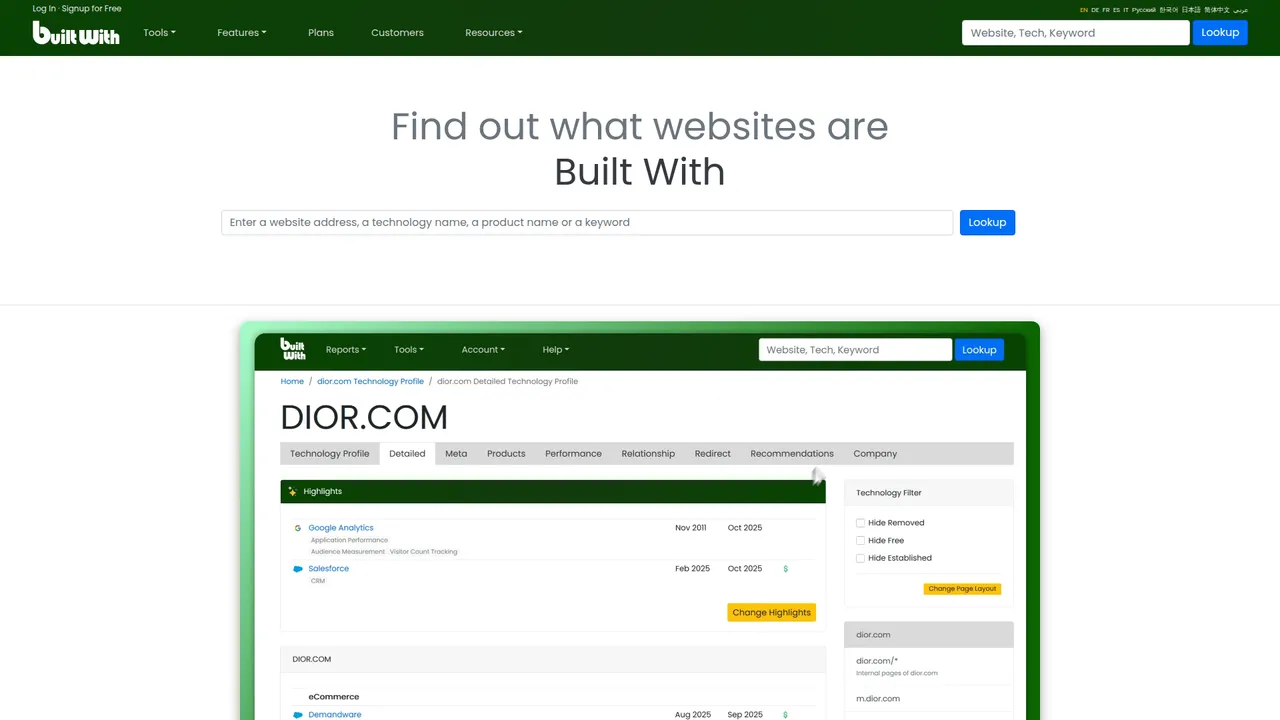
BuiltWith publicly says it covers 113,124+ internet technologies. On the homepage, it also claims tech trend data back to January 1985, over 2,500 eCommerce technologies, and 2 billion unique eCommerce products across 26 million eCommerce websites.
That’s not nothing. That’s a real crawl/indexing operation.
If you’re trying to understand ecosystem structure — who uses Shopify vs BigCommerce, who has Salesforce installed, which ecommerce segment is leaning into Klaviyo, which category is consolidating around one stack — breadth matters. A lot.
Historical trend data is more valuable than the homepage explains
Most people think BuiltWith is just a website profiler. That’s the shallow read.
The deeper value is historical movement. first detected, last detected, stack shifts, category-level usage trends — that’s where the tool starts becoming useful for market mapping instead of just SDR list pulling.
When I was running outbound experiments years ago, the best technographic campaigns were never “all users of X.” They were “companies likely transitioning away from Y into X” or “businesses that recently crossed into a maturity band where this tool becomes relevant.” That’s a much better bet.
The free lookup still has real utility
I’m not above saying the obvious: the free lookup is handy.
For founders, PMMs, SDRs, agency operators, or anyone doing ad hoc research on a single domain, it solves a real problem in seconds. If your actual need is “what does this site appear to run?” the free product already gets you a decent amount of value.
And honestly, that’s why a lot of people should stop there.
The big limitation nobody says loudly enough: BuiltWith only sees the website surface
This is the structural caveat for BuiltWith, Wappalyzer, Ful.io, and basically the whole front-end scanner category.
They are mostly inferring from what can be detected on or around a public-facing website:
- JavaScript libraries
- analytics tags
- CMS footprints
- marketing pixels
- widgets
- ecommerce platform clues
- CDN / hosting / SSL / DNS-adjacent signals
- page-source and request-level artifacts
That is useful. Sometimes very useful.
But it is still a partial view.
What they usually cannot tell you with confidence just from front-end tech detection:
- who the company’s customers are
- who buys from them repeatedly
- what contracts or commercial relationships exist
- whether they are actively evaluating a new vendor right now
- whether budget got approved this quarter
- whether a buyer just joined and is about to rip out the old stack
- which internal system is mission-critical but completely invisible on the public site
And this is exactly where teams get sloppy.
They see a clean list of websites using some stack and mentally upgrade that into “market map,” “pipeline,” or “intent.” It is none of those things by default.
A website might show HubSpot, Segment, Shopify, or Marketo in the front end. Fine. That still tells you almost nothing about:
- the company’s customer base
- their actual vendor contracts beyond visible scripts
- internal tools hidden behind auth
- procurement timing
- account health
- who the real buyer is
Put more bluntly: front-end tech scanners are about website-observable tech, not total company intelligence.
That limitation is not a bug unique to BuiltWith. It is the entire category.
Why this matters more than people think
If your go-to-market hypothesis is literally tied to visible web tech, great. BuiltWith can help.
If your real question is:
- “Who are this company’s customers?”
- “Which accounts look like my best current customers?”
- “What changed this week that opens a window?”
- “Who competes with them and who do they sell to?”
…then a front-end scanner is the wrong center of gravity.
That’s where there is a whole different paradigm of data that has nothing to do with scraping visible JavaScript off a homepage.
For example, NinjaPear’s Customer Listing API maps customers, investors, and partners for a company based on its website. That is a completely different question from “what scripts are on the page?” It gets you into relationship intelligence rather than front-end fingerprinting.
That distinction matters because a lot of revenue teams do not actually need better tech detection. They need to know:
- who buys from a company
- who overlaps with their existing customer base
- who just changed direction
- what is happening around an account right now
That is why I keep saying most companies do not have a BuiltWith problem. They have an account selection and timing problem.
Where BuiltWith starts to get expensive and annoying
This is where the CEO lens matters. Sticker price is only half the story.
The pricing looks cleaner than the actual operating reality
Public pricing is straightforward enough:
- Basic: $295/mo
- Pro: $495/mo
- Team: $995/mo
BuiltWith’s own knowledge base adds useful context:
- Basic gives you two technologies and 2,000 upload analysis credits/month
- Pro gives you unlimited technologies and 20,000 upload analysis credits/month
- Team is described as unlimited everything except API credits with 1.2M/year or 100,000/month API credits
The pricing page and KB aren’t perfectly cleanly aligned on the Team monthly number (the KB also references $9,950/year or $950/month). That kind of mismatch is not fatal, but it’s exactly the sort of detail that makes finance people grumpy.
My real issue is simpler: $295/month sounds survivable until you realize the Basic plan is restrictive enough that any serious experimentation pushes you up-market fast.
Tech detection is not the same thing as a revenue-ready lead list
This is the biggest workflow lie in the whole category.
A technographic list without contactability is half a workflow pretending to be a full workflow.
One Reddit thread captured this perfectly.
That comment is anecdotal, not gospel. But the workflow pain is real.
And the reply underneath was even more useful than the complaint.
That is the category in one paragraph.
Most buyers underestimate the cleanup cost after export
This is the part nobody wants to budget for because it makes the “cheap list” look expensive.
After export, you still need:
- contact enrichment
- email verification
- account prioritization
- timing signal validation
- CRM sync and dedupe
- human judgment on edge cases and junk accounts
So no, the real cost is not $295 or $495.
The real cost is the rest of the stack plus the labor you now need to make the CSV usable.
Support and onboarding friction should be noted, even if it’s anecdotal
I found one Reddit complaint from someone trying to buy the product who couldn’t get through ID verification and said support was unresponsive.
Again: anecdotal, not universal truth.
But if a tool is hard to buy, hard to onboard, or weirdly finicky at the moment the customer is trying to give you money, that absolutely belongs in the ROI conversation.
BuiltWith pricing in 2026 — the real cost is not the subscription
This is where I’d force a CFO and a sales leader to sit in the same room for 20 minutes.
What each plan actually means in practice
| Plan | Public price | What it really means | Who should approve this spend? |
|---|---|---|---|
| Basic | $295/mo | Two-technology scope, narrow hunts, limited experimentation | Only if your ICP is painfully specific |
| Pro | $495/mo | First plan that feels viable for recurring list building | A team that will run sustained tests every month |
| Team | $995/mo (KB also references $950/mo or $9,950/yr) | Shared use, repeated exports, larger ops muscle | Only if multiple users are actively monetizing it |
| Advanced | $144/yr | Detailed individual site lookups, not lead-gen operations | Solo users doing research, not pipeline building |
Basic is not “starter.” It’s “you already know what you’re doing.”
Pro is the first plan I’d consider operationally viable.
Team only makes sense if the output is feeding a repeatable machine, not a random collection of experiments.
The hidden budget line items nobody mentions
Here is the budget that actually shows up in real life.
| Cost line item | Low-end monthly | More realistic monthly | Why it exists |
|---|---|---|---|
| BuiltWith subscription | $295 | $495 | You need the raw technographic list |
| Enrichment tool (Apollo/Clay/etc.) | $99 | $500+ | You still need people and contact data |
| Verification tool | $25 | $150 | Because bounce rates will punish lazy workflows |
| SDR cleanup time | $300 | $1,500+ | Someone has to dedupe, validate, prioritize |
| CRM/ops overhead | $100 | $500 | Sync, routing, field mapping, dedupe |
| Engineering time for API workflows | $0 | $1,000+ amortized | Only “free” if you ignore internal labor |
| Estimated all-in | $819 | $4,145+ | This is the real budget conversation |
That’s why I get annoyed when someone says “BuiltWith is only $295/month.”
No. BuiltWith is only $295/month if the CSV itself is the outcome. In most sales orgs, it isn’t.
A simple ROI mini-model
Let’s do the boring math because the boring math is what saves you.
Assume:
- you export 10,000 domains
- only 10% become reachable contacts after enrichment + verification
- only 2% of those turn into qualified conversations
That leaves you with:
- 1,000 reachable accounts
- 20 qualified conversations
Now let’s price it.
If your all-in monthly cost is a conservative $1,000, that’s:
- $1.00 per reachable account
- $50 per qualified conversation
Not bad.
But if your true monthly cost is closer to $3,000 after enrichment, verification, ops time, and cleanup, then you’re at:
- $3.00 per reachable account
- $150 per qualified conversation
Still maybe fine.
Now add reality: low-fit accounts, stale detections, unreachable owners, and weak timing. Suddenly your “cheap technographic list” can get expensive as hell.
BuiltWith API review — usable, but not the firehose people imagine
I care about systems. So let’s talk docs.
What the docs say
BuiltWith’s public Domain API docs say:
- Maximum 8 concurrent requests
- Maximum 10 requests per second before you hit 429 errors
- The free API is rate limited to 1 request per second
That’s not me editorializing. That’s in the docs.
API constraints table
| API factor | BuiltWith public doc detail | My take |
|---|---|---|
| Concurrent requests | 8 max | Fine for moderate workflows, not massive fan-out |
| Requests per second | 10 max | Enough for deliberate enrichment, not “spray everything” |
| Free API rate limit | 1 req/sec | Good for testing, not production ambition |
| 429 behavior | Explicitly documented | Your engineering team needs backoff logic |
| Team plan API credits | 100,000/month per KB | Useful, but absolutely finite |
Why this matters operationally
This is perfectly workable for moderate enrichment and internal tools.
It is not a magic infinite stream.
If your team says, “we’ll just pipe this into everything,” they need to speak to engineering first. Preferably before promising a quarter’s worth of automation on a whiteboard.
My take as someone who cares about systems, not toy demos
The API is good enough for deliberate workflows.
It is not the kind of thing I’d describe as infinitely flexible unless I wanted to create pain for my own team later.
That’s not a knock. It’s just adult software planning.
Hands-on benchmark: what I could actually verify
I’m not going to fake a lab benchmark I can’t access cleanly. No fake dashboards. No fake receipts. No bullshit.
What I could verify publicly for this article was:
- BuiltWith homepage and free lookup entry point
- BuiltWith pricing and plan details from public pages/docs
- BuiltWith detailed domain lookup attempts hit a human-test gate during browsing
- Wappalyzer public pricing and workflow positioning
- Ful.io public pricing and workflow positioning
- The category-wide limitation that these tools mainly operate off front-end / website-observable signals
Here’s the BuiltWith lookup attempt on wayfair.com in the browser during research. It hit a loading/human-test wall before a readable detailed report rendered.

That itself is worth noting. A public lookup flow that gets stuck on anti-bot/human checks is not the end of the world, but it does limit frictionless verification during research.
Lightweight benchmark score table
Since I could not credibly run the full 25-domain export benchmark without authenticated access and stable report rendering, I’m publishing the smaller benchmark I could stand behind.
| Metric | BuiltWith | Wappalyzer | Ful.io | Winner |
|---|---|---|---|---|
| Public pricing transparency | ⭐⭐⭐⭐☆ | ⭐⭐⭐⭐⭐ | ⭐⭐⭐⭐⭐ | Wappalyzer / Ful.io |
| Free/public research accessibility | ⭐⭐⭐☆☆ | ⭐⭐⭐⭐☆ | ⭐⭐⭐⭐☆ | Wappalyzer / Ful.io |
| Historical trend positioning | ⭐⭐⭐⭐⭐ | ⭐⭐⭐☆☆ | ⭐⭐⭐☆☆ | BuiltWith |
| Commercial lead-gen seriousness | ⭐⭐⭐⭐☆ | ⭐⭐⭐⭐☆ | ⭐⭐⭐☆☆ | BuiltWith / Wappalyzer |
| Depth beyond front-end observability | ⭐⭐☆☆☆ | ⭐⭐☆☆☆ | ⭐⭐☆☆☆ | None of them |
| Friction during public testing | ⭐⭐☆☆☆ | ⭐⭐⭐⭐☆ | ⭐⭐⭐⭐☆ | Wappalyzer / Ful.io |
If I get stable authenticated access later, I’d happily publish the full 25-domain benchmark with raw CSVs. But I’m not inventing a test result just to make the article look complete.
BuiltWith vs the alternatives a CEO should actually consider
Don’t compare everything to everything. Compare the job-to-be-done.
BuiltWith vs Wappalyzer
Wappalyzer’s public pricing is cleaner and, frankly, easier to justify for many teams.
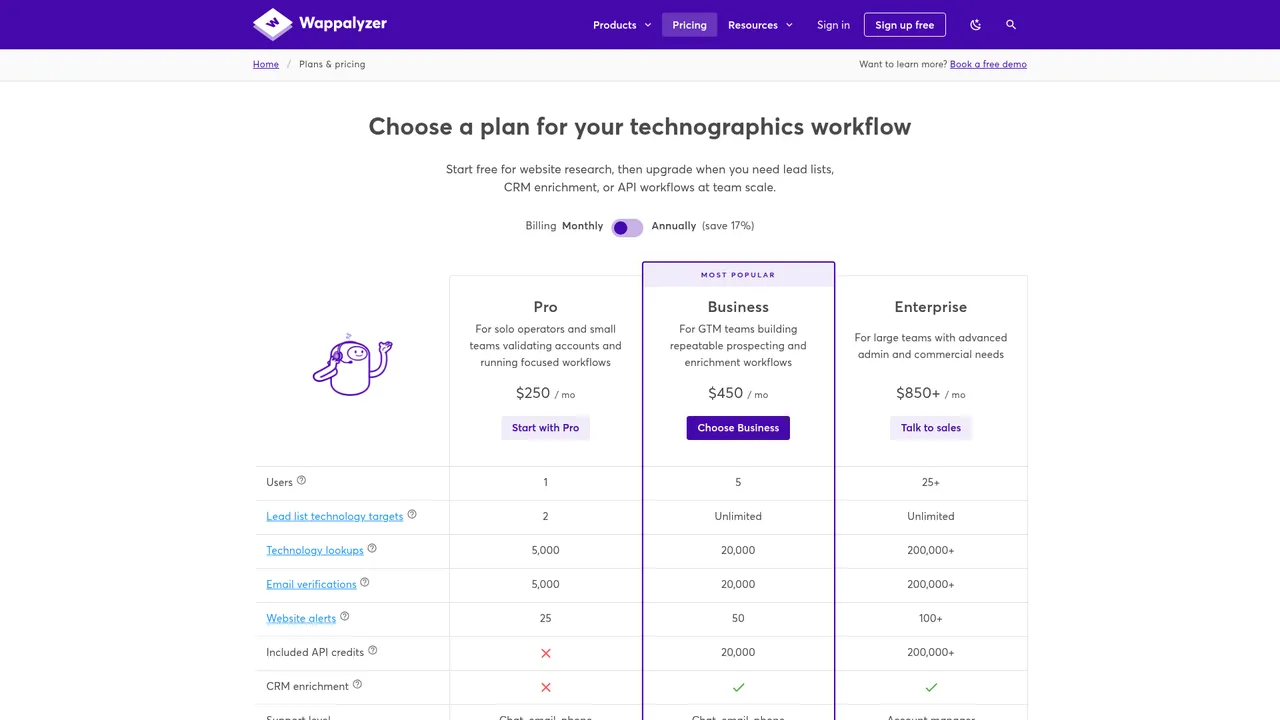
Their pricing page currently shows:
- Pro: $250/mo
- Business: $450/mo
- Enterprise: $850+/mo
- Free account with 50 technology lookups/month and sample lead lists
It also clearly spells out features like:
- 5,000 lookups on Pro
- 20,000 lookups on Business
- API credits included from Business upward
- CRM enrichment on Business+
My take:
- Wappalyzer is better for cheaper, simpler, operator-level lookup and lighter team workflows.
- BuiltWith is better for bigger historical-trend work and mature commercial technographic prospecting.
If I’m a solo operator, I probably start with Wappalyzer.
If I’m an investor, analyst, or a niche ecosystem seller with a sharp ICP, BuiltWith starts making more sense.
BuiltWith vs Ful.io
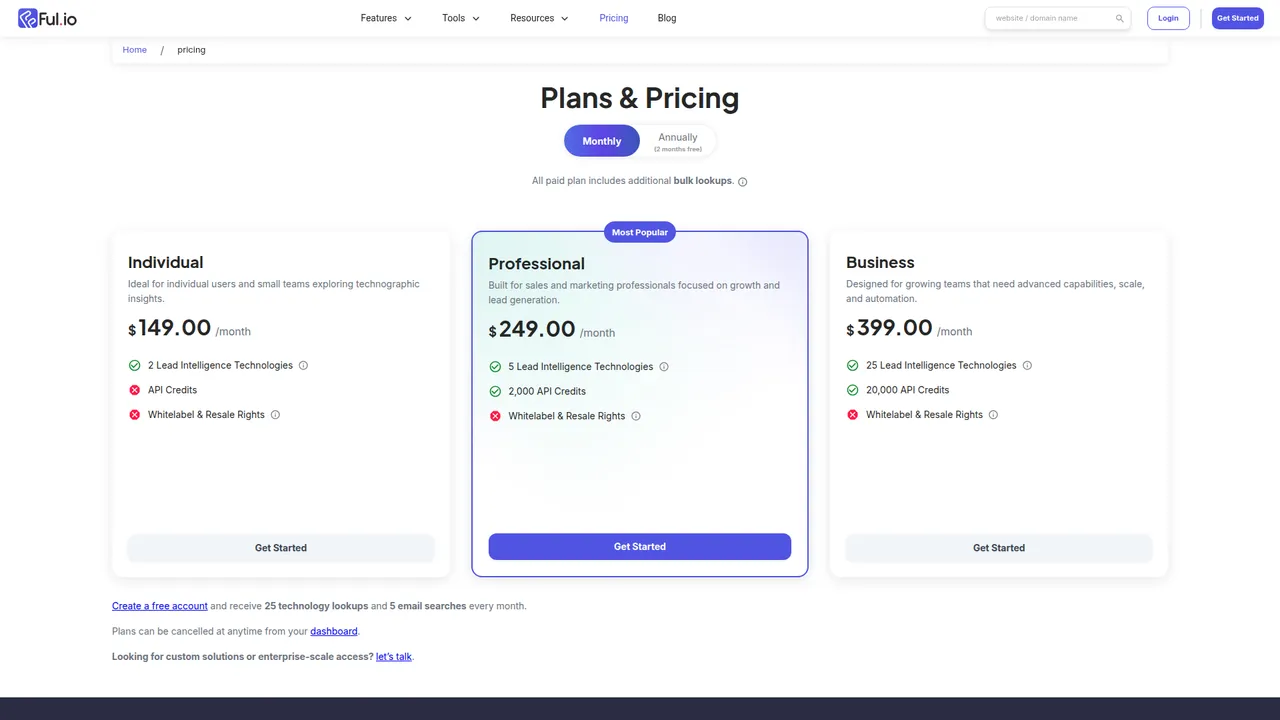
Ful.io’s public pricing undercuts BuiltWith hard:
- Individual: $149/mo with 2 lead intelligence technologies
- Professional: $249/mo with 5 technologies and 2,000 API credits
- Business: $399/mo with 25 technologies and 20,000 API credits
- Free account with 25 technology lookups and 5 email searches/month
Ful.io also positions itself more directly around lead intelligence and includes email-search language on the public site, which matters if you’re trying to close the workflow gap faster.
My take:
- Ful.io is a more budget-conscious option for some teams.
- BuiltWith feels stronger on maturity, brand trust, and historical depth.
- If your team is experimenting and cost-sensitive, Ful.io deserves a look.
BuiltWith vs a broader company-intelligence workflow
This is the strategic distinction most buyers miss.
BuiltWith answers:
What technology does this website appear to use?
A broader company-intelligence workflow answers:
Who buys from them, who competes with them, what changed recently, and what’s happening around the company?
That’s why I keep saying a lot of teams buy technographics when the real problem is account intelligence and timing.
If what you actually need is:
- customer and partner mapping
- competitor mapping
- company monitoring
- leadership/team changes
- product, pricing, or messaging shifts
…then technographics alone is the wrong center of gravity.
That’s where something like NinjaPear fits naturally after detection, not instead of it. BuiltWith can help you identify a stack-based slice of the market. NinjaPear is for understanding what’s actually happening around those accounts so you don’t reach out at the wrong damn time.
And more importantly, NinjaPear is working in a different data paradigm altogether. It is not trying to infer everything from visible front-end code. It can map customer relationships, company details, competitors, employees, and company changes from a website input. That is a different job.
What Redditors are saying about BuiltWith
I like Reddit because it strips away the sales deck voice.
It also over-indexes on frustration. So read these as texture, not divine truth.
1) Lead quality / workflow gap
Small sample, sharp lesson: technographics are not contactability.
2) No contact data problem
That’s the exact workflow gap I’d put on the buying committee slide.
3) Pricing skepticism
I couldn’t find a clean Reddit quote with broad consensus and enough context to treat as representative. What I did find was a recurring theme in discussion: people saying BuiltWith is powerful, but the price only works if the use case is highly defined.
Honestly, I agree.
A broad-market team with fuzzy targeting can waste $495/month on BuiltWith very efficiently.
4) Alternative comparison
I found a useful comparison comment in a Reddit thread about BuiltWith alternatives.
Not the strongest quote in the world, but it does reflect a common pattern: when buying friction or price friction shows up, people jump to Wappalyzer fast.
5) Onboarding/payment friction
Already covered above, but worth repeating: even anecdotal friction matters when you’re trying to get a team running this quarter, not next quarter.
My hot takes on BuiltWith
I’ll save you the diplomatic version.
- BuiltWith is a real product. But a lot of teams buy it as a shortcut to pipeline, and that is where they screw themselves.
- The entry pricing is not outrageous because of the dollar amount. It’s outrageous when you compare it to how partial the workflow still is.
- Technographic targeting is useful. Technographic targeting alone is not a growth strategy.
- If I’m the CEO, I only approve this budget when the ICP is brutally specific or the research value is obvious.
- Most companies do not have a BuiltWith problem. They have an account selection and timing problem.
And one more, because I’m in the mood:
The wrong team can waste $495/month on BuiltWith very efficiently.
And another, because this is the part people keep missing:
BuiltWith, Wappalyzer, and the rest of the scanner crowd are fundamentally looking at front-end evidence. That is a useful slice of reality. It is not the whole company.
FAQ for people searching BuiltWith
Is BuiltWith free?
Sort of.
The free lookup is available for individual site research. Paid plans begin at around $295/month based on public pricing, and there’s also an Advanced plan at $144/year for detailed individual site lookups.
Is BuiltWith accurate?
Useful enough to drive research and segmentation.
Not magical enough to skip validation on high-value accounts.
If one account actually matters, verify before outreach.
Is BuiltWith worth it?
Only if your team can monetize technographic segmentation quickly and already understands the rest of the workflow.
If the plan is “buy BuiltWith and figure the rest out later,” no. Absolutely not.
What is the best BuiltWith alternative?
Depends on the job.
- Wappalyzer for lighter lookup and cleaner pricing
- Ful.io for some budget-conscious teams that want a simpler lead-intelligence angle
- NinjaPear when the real need is company intelligence, monitoring, customer mapping, relationship data, and timing signals rather than raw front-end tech detection
Final verdict: who should buy it, who should walk away
BuiltWith is not bullshit.
It’s also not a complete answer.
If I’m the CEO and my team can show me a narrow ICP, a real monetization path, and a downstream process for enrichment and outreach, I’ll sign off on it. No drama.
If the pitch is “we’ll buy BuiltWith and figure the rest out later,” absolutely not. That’s how software turns into shelfware and everyone pretends the problem was lead quality.
BuiltWith is good at telling you what a company’s site runs. It is not, by itself, a revenue engine.
And if I really want to be precise: it is part of the front-end observability layer of market research. Useful layer. Incomplete layer.
There is a whole separate paradigm beyond front-end tech scraping — customer lists, partner maps, competitor graphs, company monitoring, and relationship intelligence. If that is the actual job to be done, buy for that job instead.
So here’s the next step I’d actually recommend: before you approve budget, force your team to model one campaign on paper. Pick the technologies. Estimate reachable-contact rate. Estimate verification rate. Estimate meetings. Then ask one harder question: is technographic detection actually the bottleneck, or do you really need customer intelligence and timing signals instead?
If the math still works, fine — buy BuiltWith.
If the math falls apart, you don’t need BuiltWith. You need a better go-to-market thesis.
